
Os Grabbers são divertidos, não são? Como numa sala de jogos à beira-mar: atiras moedas para o grabber e sais desiludido. Mas um Grabber pode ser divertido no teu jogo, talvez para mover objetos de um lado para o outro, ou para agarrar um inimigo e largá-lo num poço de fogo da perdição.
Criei este script para o Episódio 3 de Cocoa2: 24 Hour Parsley People, mas simplifiquei-o aqui para que o possas adaptar facilmente aos teus próprios jogos.
Quando o tiveres a funcionar, deve ficar mais ou menos assim...
Isto é o que vamos precisar de criar:
Um sprite de 2 fotogramas para o próprio Grabber
Um sprite para os controlos do Grabber
Algum script para o jogador
Script para o Grabber
Script para os sprites que podem ser agarrados.
Sprite do Grabber
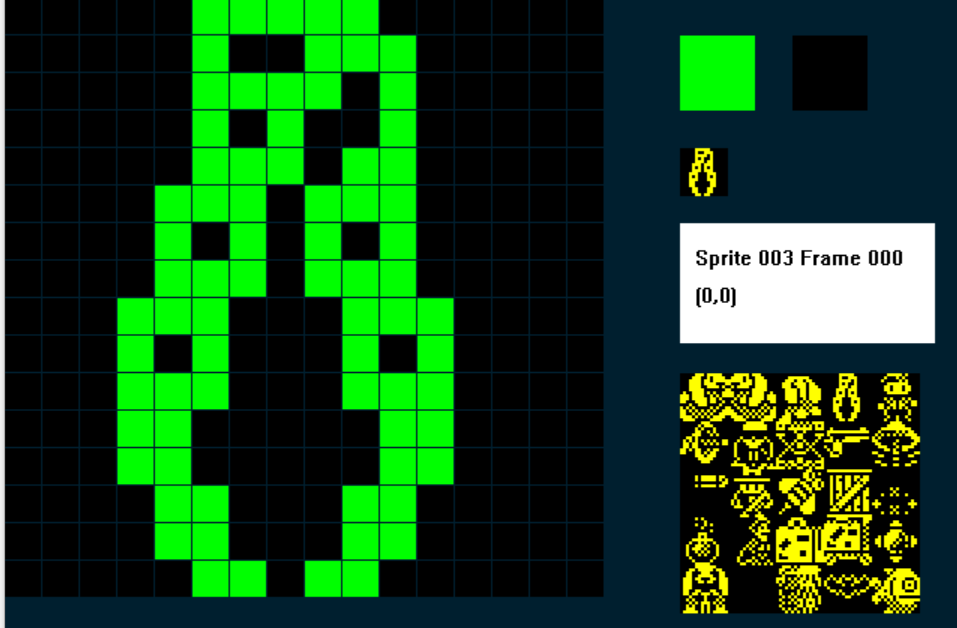
Este é o que usei; precisamos de dois fotogramas, e o fotograma 0 mostra o Grabber fechado:
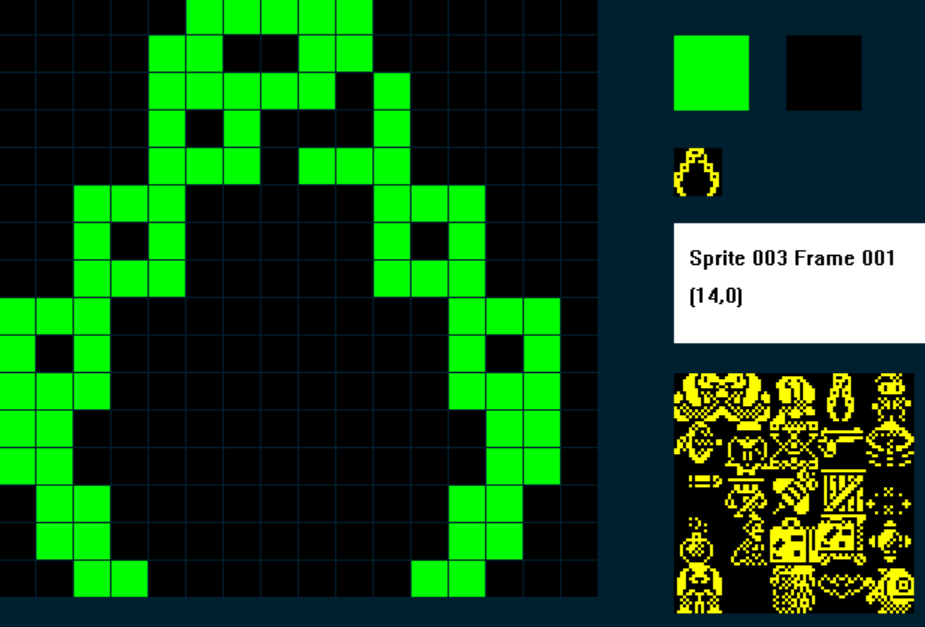
E o fotograma 1 mostra o Grabber aberto:
2. Controlos do Grabber
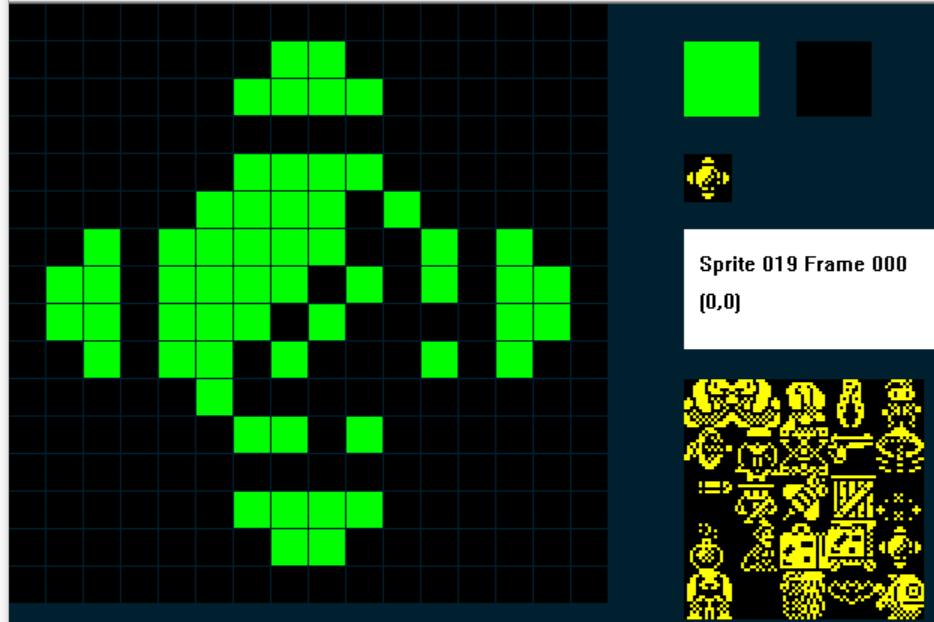
Também vamos precisar de um sprite para os controlos da máquina; quando o nosso jogador colidir com os controlos, poderá controlar o Grabber... Optei por uma coisa parecida com um joystick...
3. O script do jogador.
Estou a assumir que estás a escrever um jogo de plataformas ou de aventura padrão com vista lateral, por isso provavelmente já tens muito script para o teu jogador. O que precisamos é de uma variável que determine em que modo está o jogador: modo normal ou modo Grabber.
No meu exemplo vou usar C para guardar o valor do modo.
Assim, quando C=1 o jogador está em modo normal e pode correr e saltar como habitual, e quando C = 2 o jogador está em modo Grabber: o jogador já não se move, move-se antes o Grabber.
Portanto, o meu script do jogador, em linhas gerais, será algo assim:
IF C = 1 ; modo normal
....faz tudo o que é normal
ENDIF
IF C = 2
...faz tudo o que é do Grabber
ENDIF.
A seguir preciso de uma variável que guarde as diferentes coisas que o Grabber pode fazer; chamei-lhes estados do Grabber e uso a variável M.
Há bastantes estados!
M = 0 ; Repõe o Grabber para que volte à sua posição inicial
M = 10 ; move o Grabber para a esquerda
M = 11 ; move o Grabber para a direita
M = 12 ; o Grabber sobe mas não agarrou nada
M = 13 ; o Grabber desce mas não agarrou nada
M = 15 ; o Grabber agarrou algo e está a subir
M = 19 ; o Grabber chegou ao topo e tem algo preso
M = 20 ; o Grabber vai para a esquerda e tem algo agarrado
M= 21 ; o Grabber vai para a direita e tem algo agarrado
M = 23 ; o Grabber desce e tem algo preso
Assim, no script do teu jogador, envolve tudo o que fizeste até agora dentro de:
IF C = 1 ; modo normal
ENDIF
Por baixo disso vamos adicionar o nosso script do Grabber (prepara-te... é grande!):
;GRABBER MODE
;================
IF IMAGE = 3 ; if grabber on screen
IF C = 2 ; if player is in Grabber Mode mode
SPRITEINK 5 ; turn the Grabber cyan to show it is active
IF M < 12 ; Graber Statuses less than 12 are movements horizontally
IF KEY LEFT ; if Left key is pressed
LET M = 10 ; set grabber status to move left
ELSE ; else
IF KEY RIGHT ; if Right key is pressed
LET M = 11 ; set grabber status to move right
ENDIF
ENDIF
ENDIF
IF M = 0 ; RESET THE GRABBER
IF X <= 239 ; are we at the right edge of the screen?
IF CANGORIGHT ; no, so keep going right until we are
SPRITERIGHT ; move the grabber right, if it can
ENDIF
ENDIF
ENDIF
IF M = 10 ; move left - nothing attached
LET FRAME = 1 ; make sure Grabber is on the Open frame
IF X >= 4 ; are we at the left edge of the screen
IF CANGOLEFT ; no, so keep going left until we are
SPRITELEFT ; move the grabber left, if it can
ELSE ; if grabber can't go left
LET M = 0 ; reset the grabber status
ENDIF
IF KEY DOWN ; if the down key is pressed
LET M = 13 ; set grabber status to move down
ENDIF
ELSE ; if grabber reaches the left edge
LET M = 0 ; reset the grabber status
ENDIF
ENDIF
IF M = 11 ; MOVE RIGHT - NOTHING ATTACHED
LET FRAME = 1 ; make sure Grabber is on the Open frame
IF X <= 239 ; are we at the right edge of the screen
IF CANGORIGHT ; no, so keep going right until we are
SPRITERIGHT
ELSE
LET M = 0 ; reset the grabber
ENDIF
IF KEY DOWN ; down pressed?
LET M = 13 ; down mode
ENDIF
ELSE
LET M = 0 ; reset if we are at right edge
ENDIF
ENDIF
IF M = 12 ; GO UP - NOTHING ATTACHED
IF CANGOUP ; if grabber can go up
LET FRAME = 1 ; make sure grabber is on the open frame
SPRITEUP ; move the grabber up
LET SETTINGA = X ; store the X co-ord of the Grabber in SETTINGA
LET SETTINGB = Y ; store the Y co-ord of the Grabber in SETTINGB
ADD 6 TO SETTINGA ; add 6 to SETTINGA
DIVIDE SETTINGB BY 2 ; divide SETTINGB (Y) by two
MULTIPLY SETTINGB BY 2 ; then multiply it by two, it's now always an even number
ADD 2 TO SETTINGB ; add two to it
PLOT SETTINGA SETTINGB ; plot a pixel at SA,SB
ADD 1 TO SETTINGA ; add 1 to SA
PLOT SETTINGA SETTINGB ; and plot another pixel - so we should get a 2px by 1px line
ELSE ; if grabber can't go up
LET M = 0 ; reset the grabber
ENDIF
ENDIF
IF M = 13 ; GO DOWN - NOTHING ATTACHED
IF COLLISION 4 ; HAS THE GRABBER HIT A TYPE 4 ITEM/ENEMY?
OTHER ; if so switch to the other sprite
LET J = X ; store the other sprite's X in J
LET K = Y ; and it's Y co-ord in K
ENDSPRITE ; switch back to the Grabber
ADD 10 TO J ; check the grabber is in the Hit Box
SUBTRACT F FROM J ; F is the Grabber's X, subtract it from J
IF J >= 4 ; did we hit in pixels 4-15?
IF J <= 16
LET M = 15 ; If so set grabber status to GO UP - ATTACHED
OTHER ; switch to the sprite that has been grabbed
LET DIRECTION = 1 ; set it's direction to 1
ADD 1 TO Y ; add 1 to its Y - (cosmetically looks better)
LET X = F ; make sure it has the same X co-ord as the Grabbers
ENDSPRITE ; switch back to the Grabber
ELSE ; if the grabber MISSED TO THE RIGHT OF the Hit Box
LET M = 12 ; set the Grabber to GO UP - NOTHING ATTACHED
ENDIF
ELSE ; if the grabber missed to the left of the Hit Box
LET M = 12 ; set the Grabber to GO UP - NOTHING ATTACHED
ENDIF
ELSE ; if the Grabber hasn't an enemy
IF CANGODOWN ; if it can go down
LET FRAME = 1 ; make sure we are displaying the open grabber frame
SPRITEDOWN ; move the grabber down
LET SETTINGA = X ; store Grabber X in SettingA
LET SETTINGB = Y ; and Grabber Y in SettingB
ADD 6 TO SETTINGA ; Add 6 to SA (X)
DIVIDE SETTINGB BY 2 ; Divide SB (Y) by 2
MULTIPLY SETTINGB BY 2 ; multiply it by 2 to make sure it is an even number
INK 15 ; use cyan ink
PLOT SETTINGA SETTINGB ; plot a pixel a SA,SB
ADD 1 TO SETTINGA ; add 1 to SA
PLOT SETTINGA SETTINGB ; and plot another pixel - so we should get a 2px by 1px line
ELSE
LET M = 12
ENDIF
ENDIF
ENDIF
IF M = 15 ; GO UP - ATTACHED
IF CANGOUP ; if the grabber hasn't reached the top
LET FRAME = 0 ; display the Grabber Closed frame
SPRITEUP ; move the grabber up
LET SETTINGA = X ; store Grabber X in SettingA
LET SETTINGB = Y ; and Grabber Y in SettingB
ADD 6 TO SETTINGA ; Add 6 to SA (X)
DIVIDE SETTINGB BY 2 ; Divide SB (Y) by 2
MULTIPLY SETTINGB BY 2 ; multiply it by 2 to make sure it is an even number
ADD 2 TO SETTINGB ; and add two to it (wo we can over print the lowest link of the chain)
INK 15 ; use cyan ink
PLOT SETTINGA SETTINGB ; plot a pixel a SA,SB, this will cancel out the previous plot
ADD 1 TO SETTINGA ; add 1 to SA
PLOT SETTINGA SETTINGB ; and over plot another pixel - the lowest link of the chain will disappear
ELSE
LET M = 19 ; if we can't go up, set grabber to REACH TOP ATTACHED
ENDIF
ENDIF
IF M = 19 ; REACHED TOP ATTACHED
IF KEY LEFT ; if player presses the Left key
LET M = 20 ; set Grabber to GO LEFT ATTACHED
ELSE
IF KEY RIGHT ; if player presses the right key
LET M = 21 ; set Grabber to Go right attached
ELSE
IF KEY DOWN ; if player presses the down key
LET M = 23 ; set Grabber to GO DOWN ATTACHED
ENDIF
ENDIF
ENDIF
ENDIF
IF M = 20 ; GO LEFT - ATTACHED
LET FRAME = 0 ; make sure the grabber is displaying the closed frame
IF X >= 4 ; if the grabber isnt at the left edge
IF CANGOLEFT ; and it can go left
SPRITELEFT ; go left
ENDIF
IF KEY DOWN ; if the player presses the down key?
LET M = 23 ; set grabber to go down attached
ENDIF
ELSE ; if grabber has reached the left edge
LET M = 0 ; reset the grabber
ENDIF
ENDIF
IF M = 21 ; GO RIGHT - ATTACHED
LET FRAME = 0 ; make sure the grabber is displaying the closed frame
IF X <= 239 ; if the grabber isnt at the right edge
IF CANGORIGHT ; and it can go right
SPRITERIGHT ; go right
ENDIF
IF KEY DOWN ; if the player presses the down key?
LET M = 23 ; set grabber to go down attached
ENDIF
ELSE ; if grabber has reached the right edge
LET M = 0 ; reset the grabber
ENDIF
ENDIF
IF M = 23 ; GO DOWN - ATTACHED
IF CANGODOWN ; if the grabber hasn't reached the bottom
LET FRAME = 0 ; display the Grabber Closed frame
SPRITEDOWN ; go down
LET SETTINGA = X ; store Grabber X in SettingA
LET SETTINGB = Y ; and Grabber Y in SettingB
ADD 6 TO SETTINGA ; Add 6 to SA (X)
DIVIDE SETTINGB BY 2 ; Divide SB (Y) by 2
MULTIPLY SETTINGB BY 2 ; multiply it by 2 to make sure it is an even number
PLOT SETTINGA SETTINGB ; plot a pixel at SA, SB
ADD 1 TO SETTINGA ; add one to SA
PLOT SETTINGA SETTINGB ; and plot another pixel, so we have a 2x1 pixel line
ELSE
LET M = 12 ; if we reach the bottom, release whatever we had grabbed
ENDIF ; and GO UP - NOTHING ATTACHED
ENDIF
ENDIF
LET F = X ; store the Grabber X in F
LET G = Y ; and the grabber Y in G
ENDIF ; END OF GRABBER MODE4. O script do Grabber
Então, isso vai controlar o Grabber. Mas também precisamos de adicionar código para o Grabber. Na prática, o Grabber tem de estar visível no ecrã mas sem fazer nada até o jogador tocar nos controlos. Por isso, vamos usar um tipo de sprite diferente e definir inicialmente o Grabber com esse tipo; depois, quando o jogador colidir com os controlos, fazemos o Grabber mudar o seu tipo de sprite para 0 (jogador), permitindo assim que o jogador o controle.
Vou usar o tipo 8
;=======================================INACTIVE GRABBER
IF IMAGE 3              ; the Grabber Sprite
   IF C = 2             ; if player is in Grabber Mode
      LET TYPE = 0      ; change Grabber's TYPE to 0 so we can control it
   ENDIF
   STOPFALL             ; stop the Grabber from falling
ENDIF
Bastante simples: se C = 2, o jogador está em modo Grabber, por isso muda o tipo de sprite do Grabber para 0.
5. O script dos controlos do Grabber
Isto também é simples: o sprite dos controlos do Grabber está parado, é basicamente um interruptor; tocas-lhe e acontecem coisas. O jogador não se pode mover, em vez disso passa a controlar o Grabber:
;========================================GRABBER CONTROLS

IF IMAGE 19             ; the grabber controls sprite
   IF COLLISION 0       ; if player touches the controls
      LET C = 2         ; put the player into Grabber Mode
      LET J = X         ; store the controls X coord in J
      LET K = Y         ; store the controls Y co-ord in K
   ELSE                 ; if player isn't touching controls
      LET C = 1         ; put the player in Normal Mode
   ENDIF
ENDIF
6. Algum script para os sprites que podem ser agarrados
Em Cocoa2:24 Hour Parsley People fiz vários sprites 'agarráveis' com consequências diferentes; nesta versão simplificada vamos ficar só por um.
Vai precisar de uma variável (uma local serve... vou usar DIRECTION) que nos diga se o item foi agarrado ou não. Depois, com base no valor atual de M (lembras-te dele do início?) saberemos para onde vai o Grabber, de modo que o item agarrado se mova em conjunto com ele... magia!
Assim, quando DIRECTION = 1, o sprite foi agarrado; no evento do teu sprite adiciona:
IF IMAGE = 17
   IF DIRECTION = 1                ; we set Direction to 1 when the Grabber grabs this sprite
      IF C = 2                     ; check player is in Grabber Mode
         IF M <> 0                 ; if Grabber is doing something
            IF CANGOUP             ; if Grabber can go up
               LET Y = G           ; align the Grabbed sprite with the Grabber
               ADD 16 TO Y         ; then put the Grabbed sprite directly below the grabber
            ENDIF
         ENDIF
         IF M < 15                 ; Grabber Statuses < 15 require releasing any grabbed sprites
            FALL                   ; so release the Grabbed sprite
            LET DIRECTION = 0      ; The sprite is no longer grabbed
         ENDIF
         IF M = 20                 ; GO LEFT - ATTACHED
            IF CANGOLEFT           ; if sprite can go left
               SPRITELEFT          ; go left
            ELSE                   ; if it cant go left
               FALL                ; fall
               LET DIRECTION = 0   ; The sprite is no longer grabbed
               LET M = 0           ; reset the grabber
            ENDIF
         ENDIF

         IF M = 21                 ; GO RIGHT - ATTACHED
            IF CANGORIGHT          ; if sprite can go right
               SPRITERIGHT         ; go right
            ELSE                   ; if it can't go right
               FALL                ; fall back down
               LET DIRECTION = 0   ; The sprite is no longer grabbed
               LET M = 0           ; reset the grabber
            ENDIF
         ENDIF

         IF M = 23                 ; GO DOWN ATTACHED
            IF CANGODOWN
            ELSE                   ; if the grabbed item has reached solid ground
               LET M = 12          ; set the Grabber to GO UP - NOTHING ATTACHED
               LET DIRECTION = 0   ; The sprite is no longer grabbed
            ENDIF
         ENDIF
      ELSE                         ; grabbed sprite should fall whenever player is not in Grabber Mode
         FALL
      ENDIF
   ENDIF
ENDIF
...claro que terás de ajustar isto aos números de IMAGE corretos do teu jogo!
Por fim, precisamos de adicionar código ao script do jogador que lhe permita voltar ao modo normal, saindo dos controlos do Grabber. Vamos adicioná-lo no fim do evento do jogador e, só quando o Grabber não estiver em ação, o jogador pode premir o botão de disparo para se libertar dos controlos do Grabber:
IF C = 2                                       ; We need a way for the player to release the controls to the grabber
   IF M = 0                                    ; if the Grabber is not in action
      IF KEY FIRE1                             ; and player presses the fire key
         IF IMAGE = 3                          ; switch the grabber (Image 3)
             LET TYPE = 8                      ; to TYPE 8
         ENDIF
         IF IMAGE <> 3                         ; the players sprites are 0-2 in my example
            LET C = 1                          ; switch back to Normal player mode
            IF X <= J                          ; if player is to the left of the Grabber controls
               IF CANGOLEFT                    ; move the player left, so he is no longer touching the controls
                  SPRITELEFT
               ENDIF
            ELSE                               ; if player is to the right of the Grabber controls
               IF CANGORIGHT                   ; move the player left, so he is no longer touching the controls
                  SPRITERIGHT
               ENDIF
            ENDIF
            LET M = 0                          ; make sure the Grabber is reset
            LET SETTINGA = 0                   ; reset setting A
            LET SETTINGB = 0                   ; and reset SETTINGB
         ENDIF
      ENDIF
   ENDIF
ENDIF
Por fim, adiciona o teu Grabber ao ecrã com o editor SPRITEPOSITIONS; lembra-te de definir inicialmente o teu Grabber com o TIPO inativo (no meu exemplo acima o Grabber é do TIPO 8 até ser ativado, altura em que passa a ser do TIPO 0 (evento do jogador)
E é isto!
Então, as regras desta mecânica são:
O jogador toca nos controlos
O jogador fica inativo
O Grabber fica ativo
Ao premir esquerda, o Grabber desloca-se ao longo da grua para a esquerda; para manter o interesse, como numa máquina de garra, continua a mover-se para a esquerda até premirmos direita ou baixo (mesmo que eu largue a esquerda!). O mesmo se aplica aos movimentos para a direita e para baixo
O Grabber tem de acertar num item agarrável dentro de uma caixa de colisão, sem ser demasiado para a esquerda ou para a direita... para manter o desafio!
O Grabber e o item agarrado têm de voltar ao topo da grua para depois poderem mover-se para a direita ou para a esquerda
Se o Grabber chegar ao limite esquerdo ou direito, ou for impedido de algum modo, larga o que tinha agarrado!
O jogador prime baixo para largar o item agarrado no local pretendido.
O jogador prime disparo quando o Grabber não está em movimento, para sair dos controlos do Grabber e voltar ao modo normal
Quando o tiveres a funcionar, tenta adaptá-lo para acrescentar mais coisas divertidas... aqui ficam alguns exemplos de Cocoa 2: 24 Hour Parsley People