
Grabber's are fun, right, like in a seaside amusement arcade, hurl coins into the grabber and leave disappointed. But a Grabber might be fun in your game, perhaps use it to move items around, or grab an enemy and drop him into a fiery pit of doom.
I created this script for Episode 3 of Cocoa2: 24 Hour Parsley People, but I've simplified it here so that you should be able to easily adapt it for your own games.
Once you are up and running, it should look something like this...
Here's what we'll need to create:
A 2 frame Sprite for the Grabber itself
A Sprite for the Grabber Controls
Some Script for the Player
Script for the Grabber
Script for the sprited that can be Grabbed.
Grabber Sprite
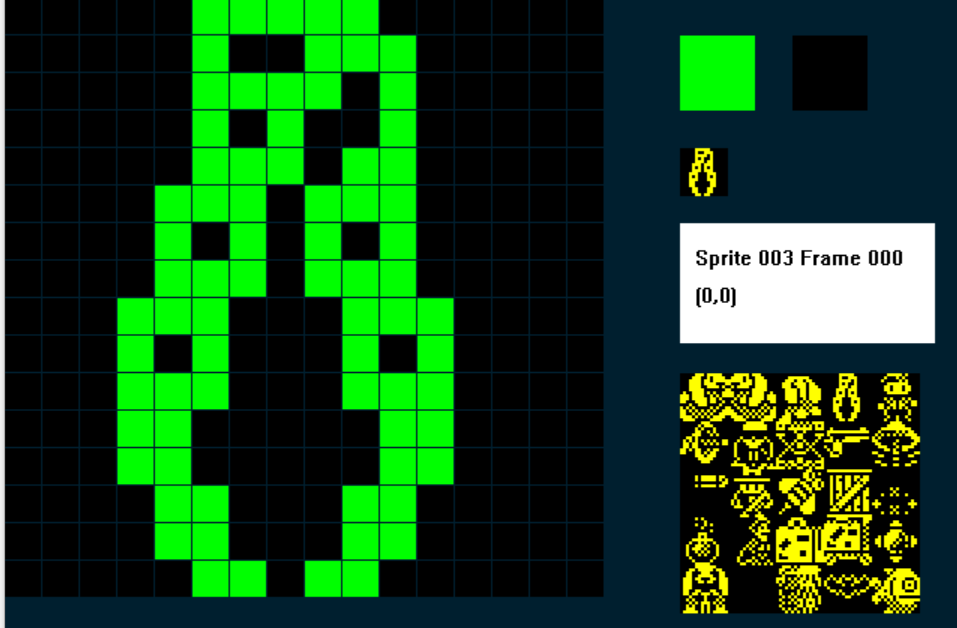
Here's the one I used, we need two frames, Frame 0 shows the grabber closed:
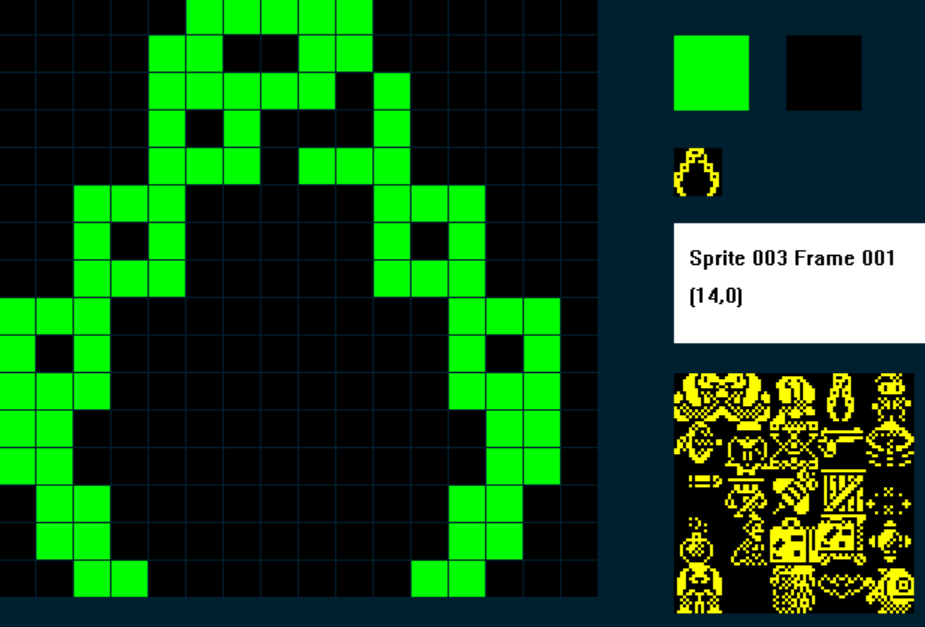
And Frame 1 shows the Grabber Open:
2. Grabber Controls
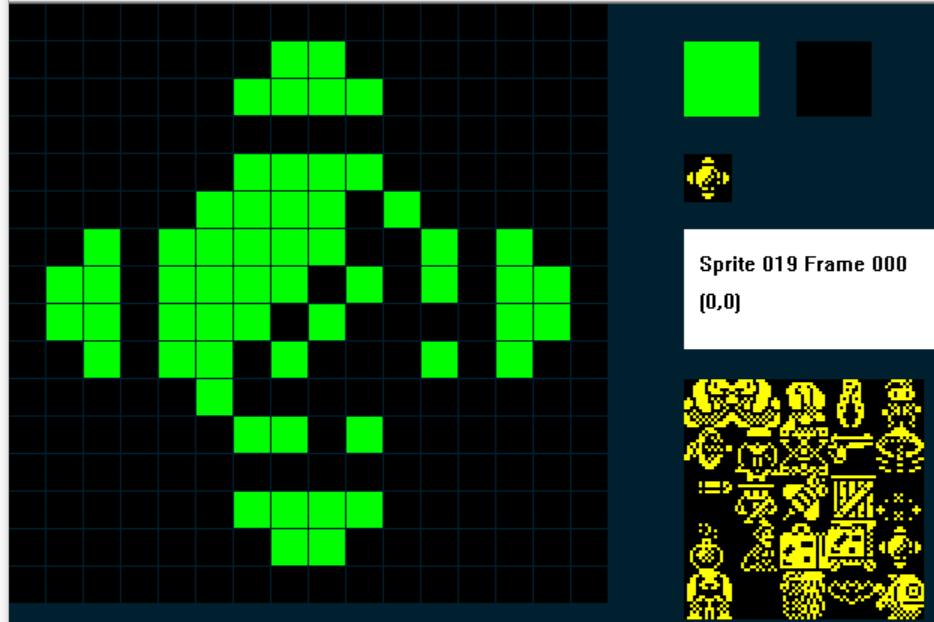
We're also going to need a Sprite for the Controls of the Grabbing machine, when our player collides with the controls they will then be able to control the grabber...I went for a joystick kinda thing...
3. The Player Script.
I'm assuming you are writing a side-on standard platform game or adventure here, so you probably have a load of script for your player already. What we need to do is use a variable which will determine which mode the player is in, either Normal Mode, or Grabber Mode.
In my example I'm going to use C to store the value of the Mode.
So when C=1 the player is in Normal Mode and he can run and jump as normal, and when C = 2, the player is in Grabber mode, the player no longer moves, but the Grabber does instead.
So my player Script will, at a high-level, look something like:
IF C = 1 ; normal mode
....do all the normal stuff
ENDIF
IF C = 2
...do all the grabber stuff
ENDIF.
The next thing I need is a variable to store the different things that the Grabber can do, I've called them Grabber Statuses, and I'm using the variable M.
There are quite a few statuses!
M = 0 ; Resets the Grabber so it has returned to its starting position
M = 10 ; move the Grabber to the left
M = 11 ; move the grabber to the right
M = 12 ; the grabber goes up but has not grabbed anything
M = 13 ; the Grabber goes down but has not grabbed anything
M = 15 ; the Grabber has grabbed something and is going up
M = 19 ; the Grabber has reached the top and has something attached
M = 20 ; the grabber goes left and has something grabbed
M= 21 ; the grabber goes right and and has something grabbed
M = 23 ; the grabber goes down and has something attached
So, in your player script, wrap everything you've done so far inside:
IF C = 1 ; normal mode
ENDIF
Then beneath that we'll add our Grabber script (brace yourself....it's a big one!):
;GRABBER MODE
;================
IF IMAGE = 3 ; if grabber on screen
IF C = 2 ; if player is in Grabber Mode mode
SPRITEINK 5 ; turn the Grabber cyan to show it is active
IF M < 12 ; Graber Statuses less than 12 are movements horizontally
IF KEY LEFT ; if Left key is pressed
LET M = 10 ; set grabber status to move left
ELSE ; else
IF KEY RIGHT ; if Right key is pressed
LET M = 11 ; set grabber status to move right
ENDIF
ENDIF
ENDIF
IF M = 0 ; RESET THE GRABBER
IF X <= 239 ; are we at the right edge of the screen?
IF CANGORIGHT ; no, so keep going right until we are
SPRITERIGHT ; move the grabber right, if it can
ENDIF
ENDIF
ENDIF
IF M = 10 ; move left - nothing attached
LET FRAME = 1 ; make sure Grabber is on the Open frame
IF X >= 4 ; are we at the left edge of the screen
IF CANGOLEFT ; no, so keep going left until we are
SPRITELEFT ; move the grabber left, if it can
ELSE ; if grabber can't go left
LET M = 0 ; reset the grabber status
ENDIF
IF KEY DOWN ; if the down key is pressed
LET M = 13 ; set grabber status to move down
ENDIF
ELSE ; if grabber reaches the left edge
LET M = 0 ; reset the grabber status
ENDIF
ENDIF
IF M = 11 ; MOVE RIGHT - NOTHING ATTACHED
LET FRAME = 1 ; make sure Grabber is on the Open frame
IF X <= 239 ; are we at the right edge of the screen
IF CANGORIGHT ; no, so keep going right until we are
SPRITERIGHT
ELSE
LET M = 0 ; reset the grabber
ENDIF
IF KEY DOWN ; down pressed?
LET M = 13 ; down mode
ENDIF
ELSE
LET M = 0 ; reset if we are at right edge
ENDIF
ENDIF
IF M = 12 ; GO UP - NOTHING ATTACHED
IF CANGOUP ; if grabber can go up
LET FRAME = 1 ; make sure grabber is on the open frame
SPRITEUP ; move the grabber up
LET SETTINGA = X ; store the X co-ord of the Grabber in SETTINGA
LET SETTINGB = Y ; store the Y co-ord of the Grabber in SETTINGB
ADD 6 TO SETTINGA ; add 6 to SETTINGA
DIVIDE SETTINGB BY 2 ; divide SETTINGB (Y) by two
MULTIPLY SETTINGB BY 2 ; then multiply it by two, it's now always an even number
ADD 2 TO SETTINGB ; add two to it
PLOT SETTINGA SETTINGB ; plot a pixel at SA,SB
ADD 1 TO SETTINGA ; add 1 to SA
PLOT SETTINGA SETTINGB ; and plot another pixel - so we should get a 2px by 1px line
ELSE ; if grabber can't go up
LET M = 0 ; reset the grabber
ENDIF
ENDIF
IF M = 13 ; GO DOWN - NOTHING ATTACHED
IF COLLISION 4 ; HAS THE GRABBER HIT A TYPE 4 ITEM/ENEMY?
OTHER ; if so switch to the other sprite
LET J = X ; store the other sprite's X in J
LET K = Y ; and it's Y co-ord in K
ENDSPRITE ; switch back to the Grabber
ADD 10 TO J ; check the grabber is in the Hit Box
SUBTRACT F FROM J ; F is the Grabber's X, subtract it from J
IF J >= 4 ; did we hit in pixels 4-15?
IF J <= 16
LET M = 15 ; If so set grabber status to GO UP - ATTACHED
OTHER ; switch to the sprite that has been grabbed
LET DIRECTION = 1 ; set it's direction to 1
ADD 1 TO Y ; add 1 to its Y - (cosmetically looks better)
LET X = F ; make sure it has the same X co-ord as the Grabbers
ENDSPRITE ; switch back to the Grabber
ELSE ; if the grabber MISSED TO THE RIGHT OF the Hit Box
LET M = 12 ; set the Grabber to GO UP - NOTHING ATTACHED
ENDIF
ELSE ; if the grabber missed to the left of the Hit Box
LET M = 12 ; set the Grabber to GO UP - NOTHING ATTACHED
ENDIF
ELSE ; if the Grabber hasn't an enemy
IF CANGODOWN ; if it can go down
LET FRAME = 1 ; make sure we are displaying the open grabber frame
SPRITEDOWN ; move the grabber down
LET SETTINGA = X ; store Grabber X in SettingA
LET SETTINGB = Y ; and Grabber Y in SettingB
ADD 6 TO SETTINGA ; Add 6 to SA (X)
DIVIDE SETTINGB BY 2 ; Divide SB (Y) by 2
MULTIPLY SETTINGB BY 2 ; multiply it by 2 to make sure it is an even number
INK 15 ; use cyan ink
PLOT SETTINGA SETTINGB ; plot a pixel a SA,SB
ADD 1 TO SETTINGA ; add 1 to SA
PLOT SETTINGA SETTINGB ; and plot another pixel - so we should get a 2px by 1px line
ELSE
LET M = 12
ENDIF
ENDIF
ENDIF
IF M = 15 ; GO UP - ATTACHED
IF CANGOUP ; if the grabber hasn't reached the top
LET FRAME = 0 ; display the Grabber Closed frame
SPRITEUP ; move the grabber up
LET SETTINGA = X ; store Grabber X in SettingA
LET SETTINGB = Y ; and Grabber Y in SettingB
ADD 6 TO SETTINGA ; Add 6 to SA (X)
DIVIDE SETTINGB BY 2 ; Divide SB (Y) by 2
MULTIPLY SETTINGB BY 2 ; multiply it by 2 to make sure it is an even number
ADD 2 TO SETTINGB ; and add two to it (wo we can over print the lowest link of the chain)
INK 15 ; use cyan ink
PLOT SETTINGA SETTINGB ; plot a pixel a SA,SB, this will cancel out the previous plot
ADD 1 TO SETTINGA ; add 1 to SA
PLOT SETTINGA SETTINGB ; and over plot another pixel - the lowest link of the chain will disappear
ELSE
LET M = 19 ; if we can't go up, set grabber to REACH TOP ATTACHED
ENDIF
ENDIF
IF M = 19 ; REACHED TOP ATTACHED
IF KEY LEFT ; if player presses the Left key
LET M = 20 ; set Grabber to GO LEFT ATTACHED
ELSE
IF KEY RIGHT ; if player presses the right key
LET M = 21 ; set Grabber to Go right attached
ELSE
IF KEY DOWN ; if player presses the down key
LET M = 23 ; set Grabber to GO DOWN ATTACHED
ENDIF
ENDIF
ENDIF
ENDIF
IF M = 20 ; GO LEFT - ATTACHED
LET FRAME = 0 ; make sure the grabber is displaying the closed frame
IF X >= 4 ; if the grabber isnt at the left edge
IF CANGOLEFT ; and it can go left
SPRITELEFT ; go left
ENDIF
IF KEY DOWN ; if the player presses the down key?
LET M = 23 ; set grabber to go down attached
ENDIF
ELSE ; if grabber has reached the left edge
LET M = 0 ; reset the grabber
ENDIF
ENDIF
IF M = 21 ; GO RIGHT - ATTACHED
LET FRAME = 0 ; make sure the grabber is displaying the closed frame
IF X <= 239 ; if the grabber isnt at the right edge
IF CANGORIGHT ; and it can go right
SPRITERIGHT ; go right
ENDIF
IF KEY DOWN ; if the player presses the down key?
LET M = 23 ; set grabber to go down attached
ENDIF
ELSE ; if grabber has reached the right edge
LET M = 0 ; reset the grabber
ENDIF
ENDIF
IF M = 23 ; GO DOWN - ATTACHED
IF CANGODOWN ; if the grabber hasn't reached the bottom
LET FRAME = 0 ; display the Grabber Closed frame
SPRITEDOWN ; go down
LET SETTINGA = X ; store Grabber X in SettingA
LET SETTINGB = Y ; and Grabber Y in SettingB
ADD 6 TO SETTINGA ; Add 6 to SA (X)
DIVIDE SETTINGB BY 2 ; Divide SB (Y) by 2
MULTIPLY SETTINGB BY 2 ; multiply it by 2 to make sure it is an even number
PLOT SETTINGA SETTINGB ; plot a pixel at SA, SB
ADD 1 TO SETTINGA ; add one to SA
PLOT SETTINGA SETTINGB ; and plot another pixel, so we have a 2x1 pixel line
ELSE
LET M = 12 ; if we reach the bottom, release whatever we had grabbed
ENDIF ; and GO UP - NOTHING ATTACHED
ENDIF
ENDIF
LET F = X ; store the Grabber X in F
LET G = Y ; and the grabber Y in G
ENDIF ; END OF GRABBER MODE4. The Grabber Script
OK, so that will control the Grabber. But we need to add some code for Grabber too. In effect the Grabber needs to be visible on the screen, but not doing anything, until the player touches the Grabber controls. So, we'll use a different sprite type and initial set the Grabber to this one, then when the player collides with the controls, we'll trigger the Grabber to change its Sprite Type to O (player), thereby allowing the player to control it.
I'm going to use Type 8
;=======================================INACTIVE GRABBER
IF IMAGE 3              ; the Grabber Sprite
   IF C = 2             ; if player is in Grabber Mode
      LET TYPE = 0      ; change Grabber's TYPE to 0 so we can control it
   ENDIF
   STOPFALL             ; stop the Grabber from falling
ENDIF
Pretty simple, if C = 2, the player is in Grabber mode, so change the grabbers sprite type to 0.
5. The Grabber Controls Script
This is also straightforward, the Grabber Controls Sprite is stationary, it's basically a switch, touch it and stuff happens, the player cant move, instead the player now controls the grabber:
;========================================GRABBER CONTROLS

IF IMAGE 19             ; the grabber controls sprite
   IF COLLISION 0       ; if player touches the controls
      LET C = 2         ; put the player into Grabber Mode
      LET J = X         ; store the controls X coord in J
      LET K = Y         ; store the controls Y co-ord in K
   ELSE                 ; if player isn't touching controls
      LET C = 1         ; put the player in Normal Mode
   ENDIF
ENDIF
6. Some script for Sprites that can be Grabbed
In Cocoa2:24 Hour Parsley People I made a bunch of sprites 'Grabable' with different consequences, in this simplified version we'll stick to just one.
It will need a variable ( a local one is fine....I'm going to use DIRECTION) that will tell us whether or not the item has been grabbed. Then, based on the current value of M (remember that from the beginning?) we'll know which way the Grabber is going so that the Grabbed Item will move in tandem with it....magic!
So, when DIRECTION = 1, the sprite has been grabbed, in your sprite event add:
IF IMAGE = 17
   IF DIRECTION = 1                ; we set Direction to 1 when the Grabber grabs this sprite
      IF C = 2                     ; check player is in Grabber Mode
         IF M <> 0                 ; if Grabber is doing something
            IF CANGOUP             ; if Grabber can go up
               LET Y = G           ; align the Grabbed sprite with the Grabber
               ADD 16 TO Y         ; then put the Grabbed sprite directly below the grabber
            ENDIF
         ENDIF
         IF M < 15                 ; Grabber Statuses < 15 require releasing any grabbed sprites
            FALL                   ; so release the Grabbed sprite
            LET DIRECTION = 0      ; The sprite is no longer grabbed
         ENDIF
         IF M = 20                 ; GO LEFT - ATTACHED
            IF CANGOLEFT           ; if sprite can go left
               SPRITELEFT          ; go left
            ELSE                   ; if it cant go left
               FALL                ; fall
               LET DIRECTION = 0   ; The sprite is no longer grabbed
               LET M = 0           ; reset the grabber
            ENDIF
         ENDIF

         IF M = 21                 ; GO RIGHT - ATTACHED
            IF CANGORIGHT          ; if sprite can go right
               SPRITERIGHT         ; go right
            ELSE                   ; if it can't go right
               FALL                ; fall back down
               LET DIRECTION = 0   ; The sprite is no longer grabbed
               LET M = 0           ; reset the grabber
            ENDIF
         ENDIF

         IF M = 23                 ; GO DOWN ATTACHED
            IF CANGODOWN
            ELSE                   ; if the grabbed item has reached solid ground
               LET M = 12          ; set the Grabber to GO UP - NOTHING ATTACHED
               LET DIRECTION = 0   ; The sprite is no longer grabbed
            ENDIF
         ENDIF
      ELSE                         ; grabbed sprite should fall whenever player is not in Grabber Mode
         FALL
      ENDIF
   ENDIF
ENDIF
...obviously you'll need to tweak this for the correct IMAGE numbers for your game!
Finally, we need to add some code to the player script that will enable the player to return to Normal Mode, by exiting the Grabber Controls, so we'll add this to the bottom of the Player Event, then, and only when the Grabber is nit in action, the player can press the Fire button to release himself from the Grabber Controls:
IF C = 2                                       ; We need a way for the player to release the controls to the grabber
   IF M = 0                                    ; if the Grabber is not in action
      IF KEY FIRE1                             ; and player presses the fire key
         IF IMAGE = 3                          ; switch the grabber (Image 3)
             LET TYPE = 8                      ; to TYPE 8
         ENDIF
         IF IMAGE <> 3                         ; the players sprites are 0-2 in my example
            LET C = 1                          ; switch back to Normal player mode
            IF X <= J                          ; if player is to the left of the Grabber controls
               IF CANGOLEFT                    ; move the player left, so he is no longer touching the controls
                  SPRITELEFT
               ENDIF
            ELSE                               ; if player is to the right of the Grabber controls
               IF CANGORIGHT                   ; move the player left, so he is no longer touching the controls
                  SPRITERIGHT
               ENDIF
            ENDIF
            LET M = 0                          ; make sure the Grabber is reset
            LET SETTINGA = 0                   ; reset setting A
            LET SETTINGB = 0                   ; and reset SETTINGB
         ENDIF
      ENDIF
   ENDIF
ENDIF
Finally, add your Grabber to your screen using the SPRITEPOSITIONS editor, remember to initially set your Grabber to the inactive TYPE (in my example above the Grabber is a TYPE 8 until it is made active, at which point it becomes a TYPE 0 (Player event)
And that's it!.
So, the rules of this mechanic are:
Player touches controls
Player becomes inactive
Grabber becomes active
Press left the grabber moves across the crane to the left, to keep it interesting, like a grabber machine it will keep moving left until we press either right or down (even if I release left!). Same with the Right and Down movements
The Grabber needs to hit a grabbable item within a hit box, not to much to the left or right....to keep it challenging!
The grabber and grabbed item must return to the top of the crane to then be able to move right or left
If the grabber reaches the left edge or right edge or is otherwise impeded it will drop whatever it had grabbed!
Player presses down to drop the grabbed item in the desired location.
Player presses Fire when the Grabber is not in motion, to exit the Grabber Controls and return to Normal Mode
Once you've got it up and running, try and adapt it to add more fun stuff...here's some examples from Cocoa 2: 24 Hour Parsley People