
Los interruptores son útiles. Imagina una tetera eléctrica sin uno, qué triste, ¿no?
Añadir interruptores a tus juegos abre un montón de posibilidades: quizá abran puertas, activen un aparato o hagan aparecer un bicho. Sea lo que sea lo que quieras que haga el jugador, este código sencillo de interruptor te ayudará a empezar.
Primero vamos a diseñar un sprite de interruptor. Si andas justo de memoria disponible, quizá baste con un solo fotograma (podemos usar SPRITEINK para colorearlo según esté encendido o apagado)... o también puedes tener un fotograma ON y otro OFF. En este ejemplo usaré dos fotogramas y color.
Este es mi sprite de interruptor de 24 Hour Parsley People: Episode 1:
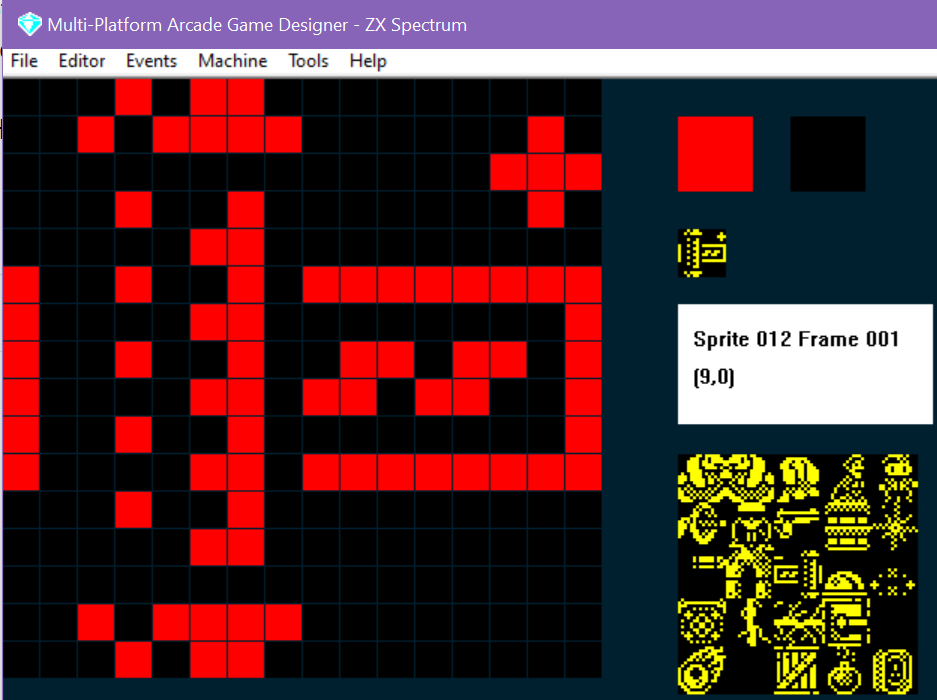
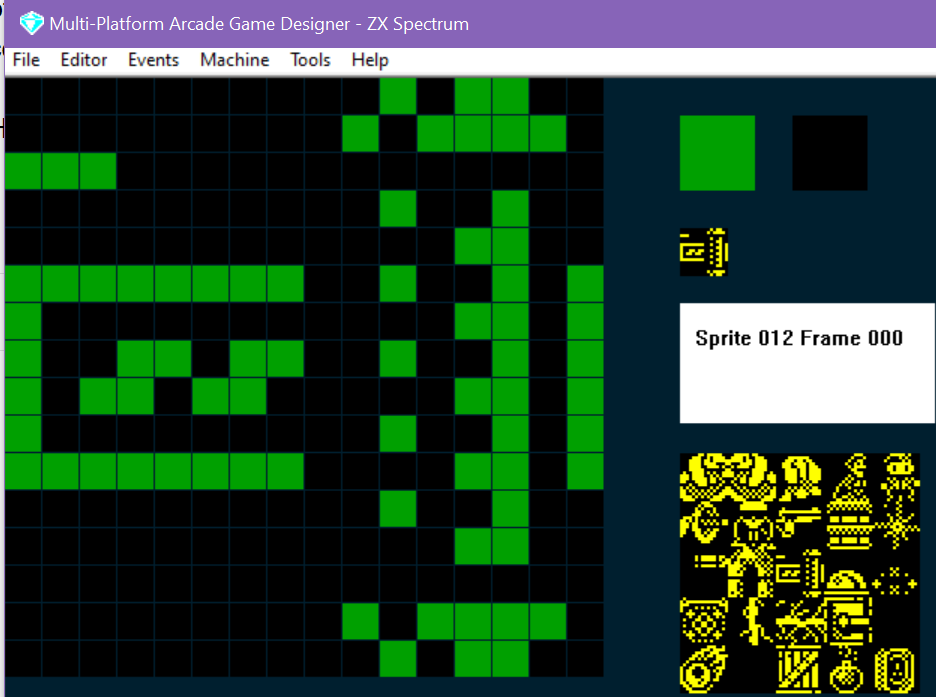
Una vez diseñado el interruptor, necesitaremos escribir un poco de código que controle que el jugador lo encienda y apague al chocar con él. La primera vez que lo intenté me hice un lío tremendo: como el cambio se activa cuando el jugador choca con el interruptor, este alternaba entre ON y OFF durante la colisión. La solución fue usar un parámetro del sprite (yo usé SETTINGA) para guardar si había una colisión activa o no, y, si la había, cambiar solo del estado actual al contrario (ON/OFF). ¡Sencillo!
Aquí está el código en acción: cuando el jugador toca el interruptor, enciende (ON) el aparato eléctrico de la derecha... y si ya estaba encendido (ON), lo apaga (OFF) (hoy no nos preocuparemos por
el código del aparato eléctrico... solo con el hecho de poder encenderlo (ON) o apagarlo (OFF))
Este es el código del SWITCH:
IF IMAGE 12			; am I a switch?
   IF E = 0                     ; is the electricity OFF?
      SPRITEINK 2               ; be red when OFF
      LET FRAME = 1             ; display the OFF frame
   ELSE                         ; otherwise I must be ON
      SPRITEINK 4               ; be green when ON
      LET FRAME = 0             ; display the ON frame
   ENDIF
   IF COLLISION 0               ; is the player touching the switch?
      IF SETTINGA = 0           ; were they NOT already touching it ?
         IF E = 1               ; if electricity is ON
            LET E = 0           ; switch it off
         ELSE                   ; otherwise its OFF
            LET E = 1           ; so we'll switch it ON
         ENDIF
         BEEP 20                ; make a sound
         LET SETTINGA = 1       ; remember the player is touching the switch
      ENDIF
   ELSE                         ; if the player isn't colliding with the switch
      LET SETTINGA = 0          ; remember we are not touching it
   ENDIF
ENDIF
Por último, para asegurarnos de que el interruptor aparece de forma suave y correcta cuando el jugador entra en una pantalla que tiene uno, añadamos unas reglas al evento SPRITE INITIALISATION:
IF TYPE 8                  ; or wherever your switch code is
   IF IMAGE 12             ; SWITCH
      IF E = 0             ; if electricity is off
         LET FRAME = 1     ; display the OFF frame
         SPRITEINK 2       ; and make it RED
      ELSE                 ; otherwise electricity is ON
         LET FRAME = 0     ; so display the ON frame
         SPRITEINK 4       ; make it green
      ENDIF
      LET SETTINGA = 0     ; to start with there is no active collision
   ENDIF
ENDIF
Ya está: interruptores rápidos y fáciles, con una variable que podemos usar en otras partes para lo que ocurra cuando hay corriente. (IF E = 1 ... ¡haz cosas malvadas de verdad!)
¡Espero que te sirva de ayuda!