
Pensei em ver algo um pouco diferente nesta parte: como podemos tornar os controlos do jogo redefiníveis. Por defeito, o MPAGD gera um Intro Menu para o teu jogo que oferece ao jogador uma escolha de controlos:
KEYBOARD
KEMPSTON JOYSTICK
SINCLAIR JOYSTICK
REDEFINE
Mas premir 4 para REDEFINE só permite ao jogador definir uma tecla de PAUSE. Até agora, o nosso jogo tem teclas para:
UP
DOWN
LEFT
RIGHT JUMP
FART
Então, como as tornamos redefiníveis?
Primeiro, vamos recordar como definimos as teclas por defeito do jogo. Fazemo-lo em KEYBOARD CONTROLS, no menu EDITORS:
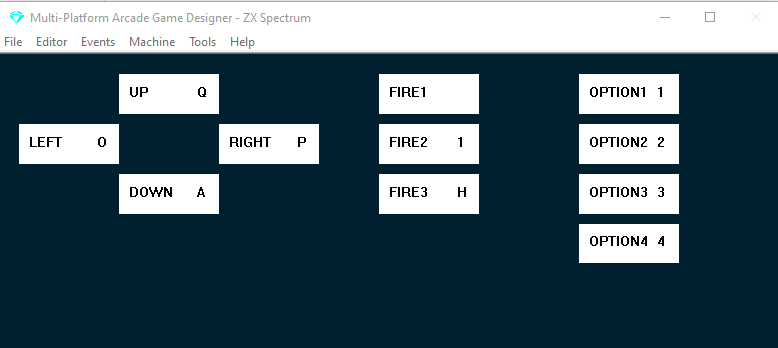
Estas são as teclas que o jogador vai usar por defeito.
Se as queremos redefiníveis, temos de acrescentar código ao INTRO MENU EVENT. É assim que o nosso está até agora:
EVENT INTROMENU

BORDER 0                    ; black border
COLOUR 5                    ; cyan ink on black paper
LET CONTROL = 99            ; initialise control with 99
WHILE CONTROL >= 99         ; for as long as control is >= 99
    CLS                     ; clear the screen
    PRINTMODE 1             ; print the following text in double height
    AT 4 10                 ; at line 4 column 10
    MESSAGE 0               ; display the game title
    CHR 33                  ; '!'
    PRINTMODE 0             ; revert back to normal height text.

    AT 8 10                 ; display the menu:
    PRINT "1. KEYBOARD"
    AT 10 10
    PRINT "2. KEMPSTON"
    AT 12 10
    PRINT "3. SINCLAIR"
    AT 14 10
    PRINT "4. REDEFINE"
    LET CONTROL = 99
    WHILE CONTROL = 99
        IF KEY OPTION1      ; if the 1 key is pressed
            LET CONTROL = 0 ; control 0 = KEYBOARD
        ENDIF
        IF KEY OPTION2      ; if  the 2 key is pressed
            LET CONTROL = 1 ; control 1 = KEMPSTON
        ENDIF
        IF KEY OPTION3      ; if the 3  key is pressed
            LET CONTROL = 2 ; control 3 is sinclair joystick
        ENDIF
        IF KEY OPTION4      ; if the 4 Key is pressed
            CLS             ; clear the screen
            AT 3 9
            PRINT "PRESS KEY FOR:"
            AT 6 12
            WHILE KEY OPTION4 ; wait for the 4 key to be released
            ENDWHILE
            PRINT "PAUSE"
            DEFINEKEY FIRE3   ; the key pressed will be the new FIRE3 key
            LET CONTROL = 100 ; set control to 100 which will end this
        ENDIF
    ENDWHILE
ENDWHILE
CLS                           ; clear the screen
CONTROL é uma variável especial do MPAGD que define qual dos métodos de controlo o jogador vai usar; os únicos valores que fazem diferença são 0 (Keyboard), 1 (Kempston Joystick) ou 2 (Sinclair Joystick)
É por isso que o código acima inicializa CONTROL com o valor 99, e o jogador não sai do menu de introdução até premir a tecla 1 (define controlo como 0 para teclado), a tecla 2 (define controlo como 1 para Kempston) ou a tecla 3 (define controlo como 2 para joystick Sinclair)
As instruções IF KEY procuram que seja premida a tecla OPTION1 (que, se olhares para a captura dos controlos de teclado acima, é por defeito a tecla “1”), OPTION2, OPTION3 ou OPTION4.
Assim, se mudares os teus controlos de teclado no editor de modo que OPTION1 seja a tecla A, terias de editar o teu menu para que dissesse A. KEYBOARD.
Confuso? Espero que não!
Voltemos ao código.
A parte que temos de mudar é a instrução IF KEY OPTION4; muda-a para o código abaixo (realçado)
EVENT INTROMENU

BORDER 0                    ; black border
COLOUR 5                    ; cyan ink on black paper
LET CONTROL = 99            ; initialise control with 99
WHILE CONTROL >= 99         ; for as long as control is >= 99
    CLS                     ; clear the screen
    PRINTMODE 1             ; print the following text in double height
    AT 4 10                 ; at line 4 column 10
    MESSAGE 0               ; display the game title
    CHR 33                  ; '!'
    PRINTMODE 0             ; revert back to normal height text.

    AT 8 10                 ; display the menu:
    PRINT "1. KEYBOARD"
    AT 10 10
    PRINT "2. KEMPSTON"
    AT 12 10
    PRINT "3. SINCLAIR"
    AT 14 10
    PRINT "4. REDEFINE"
    LET CONTROL = 99
    WHILE CONTROL = 99
        IF KEY OPTION1      ; if the 1 key is pressed
            LET CONTROL = 0 ; control 0 = KEYBOARD
        ENDIF
        IF KEY OPTION2      ; if  the 2 key is pressed
            LET CONTROL = 1 ; control 1 = KEMPSTON
        ENDIF
        IF KEY OPTION3      ; if the 3  key is pressed
            LET CONTROL = 2 ; control 3 is sinclair joystick
        ENDIF
        IF KEY OPTION4      ; if the 4 Key is pressed
            CLS             ; clear the screen
            AT 3 9
            PRINT "PRESS KEY FOR:"
            AT 6 12
            WHILE KEY OPTION4 ; wait for the 4 key to be released
            ENDWHILE
            PRINT "UP"
            DEFINEKEY UP   ; the key pressed will be the new UP key
            AT 8 12
            PRINT "DOWN"
            DEFINEKEY DOWN   ; the key pressed will be the new down key
            AT 10 12
            PRINT "LEFT"
            DEFINEKEY LEFT   ; the key pressed will be the new left key
            AT 12 12
            PRINT "RIGHT"
            DEFINEKEY RIGHT   ; the key pressed will be the new RIGHT key
            AT 14 12
            PRINT "JUMP"
            DEFINEKEY FIRE1  ; the key pressed will be the new JUMP key
            AT 16 12
            MESSAGE 3        ; message #3 is FART
            DEFINEKEY FIRE2  ; the key pressed will be the new FART key
            AT 18 12
            PRINT "PAUSE"
            DEFINEKEY FIRE3  ; this will be the PAUSE key
            LET CONTROL = 100 ; set control to 100 which will end this and will return us to the menu
        ENDIF
    ENDWHILE
ENDWHILE
CLS                           ; clear the screen
Aqui usamos o comando DEFINEKEY para pedir uma tecla, e a tecla que for premida passa a ser a nova tecla para o tipo de tecla que precisarmos. Estamos limitados a usar e redefinir apenas os 11 tipos de tecla que o MPAGD permite:
UP
DOWN
LEFT
RIGHT
FIRE1
FIRE2
FIRE3
OPTION1
OPTION2
OPTION3
OPTION4
Repara que, se tornares as teclas OPTIONx redefiníveis, elas VÃO afetar o teu menu de seleção de controlos! Assim, se o teu menu mostra 1.KEYBOARD mas alguém redefine OPTION1 como a tecla T, quando tentar selecionar teclado com a tecla 1 não vai funcionar, vai ter de premir T!
Espero que também tenhas reparado que, em vez de usar PRINT "FART", usei MESSAGE 3, porque já tenho a palavra FART guardada como mensagem reutilizável... poupei-te assim alguns bytes!
Vamos testar...
Fixe, já temos teclas redefiníveis!