
Pensé en echar un vistazo a algo un poco distinto en esta parte: cómo podemos hacer que los controles del juego se puedan redefinir. De serie, MPAGD generará un Intro Menu para tu juego que ofrece al jugador una elección de controles:
KEYBOARD
KEMPSTON JOYSTICK
SINCLAIR JOYSTICK
REDEFINE
Pero pulsar 4 para REDEFINE solo permite al jugador definir una tecla de PAUSE. Hasta ahora, nuestro juego tiene teclas para:
UP
DOWN
LEFT
RIGHT JUMP
FART
Entonces, ¿cómo hacemos que se puedan redefinir?
Primero, recordemos cómo establecimos las teclas por defecto del juego. Lo hacemos en KEYBOARD CONTROLS, en el menú EDITORS:
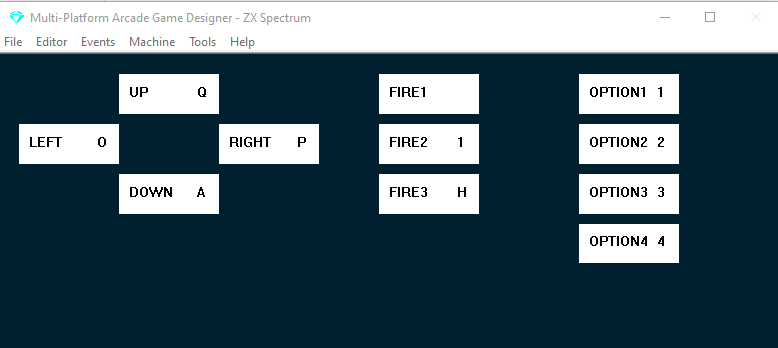
Estas son las teclas que usará el jugador por defecto.
Si queremos que se puedan redefinir, tenemos que añadir código al INTRO MENU EVENT. Así es como se ve el nuestro hasta ahora:
EVENT INTROMENU

BORDER 0                    ; black border
COLOUR 5                    ; cyan ink on black paper
LET CONTROL = 99            ; initialise control with 99
WHILE CONTROL >= 99         ; for as long as control is >= 99
    CLS                     ; clear the screen
    PRINTMODE 1             ; print the following text in double height
    AT 4 10                 ; at line 4 column 10
    MESSAGE 0               ; display the game title
    CHR 33                  ; '!'
    PRINTMODE 0             ; revert back to normal height text.

    AT 8 10                 ; display the menu:
    PRINT "1. KEYBOARD"
    AT 10 10
    PRINT "2. KEMPSTON"
    AT 12 10
    PRINT "3. SINCLAIR"
    AT 14 10
    PRINT "4. REDEFINE"
    LET CONTROL = 99
    WHILE CONTROL = 99
        IF KEY OPTION1      ; if the 1 key is pressed
            LET CONTROL = 0 ; control 0 = KEYBOARD
        ENDIF
        IF KEY OPTION2      ; if  the 2 key is pressed
            LET CONTROL = 1 ; control 1 = KEMPSTON
        ENDIF
        IF KEY OPTION3      ; if the 3  key is pressed
            LET CONTROL = 2 ; control 3 is sinclair joystick
        ENDIF
        IF KEY OPTION4      ; if the 4 Key is pressed
            CLS             ; clear the screen
            AT 3 9
            PRINT "PRESS KEY FOR:"
            AT 6 12
            WHILE KEY OPTION4 ; wait for the 4 key to be released
            ENDWHILE
            PRINT "PAUSE"
            DEFINEKEY FIRE3   ; the key pressed will be the new FIRE3 key
            LET CONTROL = 100 ; set control to 100 which will end this
        ENDIF
    ENDWHILE
ENDWHILE
CLS                           ; clear the screen
CONTROL es una variable especial de MPAGD que define cuál de los métodos de control usará el jugador; los únicos valores que importan son 0 (Keyboard), 1 (Kempston Joystick) o 2 (Sinclair Joystick)
Por eso el código anterior inicializa CONTROL con el valor 99, y el jugador no saldrá del menú de introducción hasta que pulse la tecla 1 (pone control a 0 para teclado), la tecla 2 (pone control a 1 para Kempston) o la tecla 3 (pone control a 2 para joystick Sinclair)
Las sentencias IF KEY buscan que se pulse la tecla OPTION1 (que, si miras la captura de los controles de teclado de arriba, es por defecto la tecla “1”), OPTION2, OPTION3 u OPTION4.
Así que, si cambias tus controles de teclado en el editor de modo que OPTION1 sea la tecla A, tendrías que editar tu menú para que dijera A. KEYBOARD.
¿Confuso? ¡Espero que no!
Volvamos al código.
La parte que tenemos que cambiar es la sentencia IF KEY OPTION4; cámbiala por el código de abajo (resaltado)
EVENT INTROMENU

BORDER 0                    ; black border
COLOUR 5                    ; cyan ink on black paper
LET CONTROL = 99            ; initialise control with 99
WHILE CONTROL >= 99         ; for as long as control is >= 99
    CLS                     ; clear the screen
    PRINTMODE 1             ; print the following text in double height
    AT 4 10                 ; at line 4 column 10
    MESSAGE 0               ; display the game title
    CHR 33                  ; '!'
    PRINTMODE 0             ; revert back to normal height text.

    AT 8 10                 ; display the menu:
    PRINT "1. KEYBOARD"
    AT 10 10
    PRINT "2. KEMPSTON"
    AT 12 10
    PRINT "3. SINCLAIR"
    AT 14 10
    PRINT "4. REDEFINE"
    LET CONTROL = 99
    WHILE CONTROL = 99
        IF KEY OPTION1      ; if the 1 key is pressed
            LET CONTROL = 0 ; control 0 = KEYBOARD
        ENDIF
        IF KEY OPTION2      ; if  the 2 key is pressed
            LET CONTROL = 1 ; control 1 = KEMPSTON
        ENDIF
        IF KEY OPTION3      ; if the 3  key is pressed
            LET CONTROL = 2 ; control 3 is sinclair joystick
        ENDIF
        IF KEY OPTION4      ; if the 4 Key is pressed
            CLS             ; clear the screen
            AT 3 9
            PRINT "PRESS KEY FOR:"
            AT 6 12
            WHILE KEY OPTION4 ; wait for the 4 key to be released
            ENDWHILE
            PRINT "UP"
            DEFINEKEY UP   ; the key pressed will be the new UP key
            AT 8 12
            PRINT "DOWN"
            DEFINEKEY DOWN   ; the key pressed will be the new down key
            AT 10 12
            PRINT "LEFT"
            DEFINEKEY LEFT   ; the key pressed will be the new left key
            AT 12 12
            PRINT "RIGHT"
            DEFINEKEY RIGHT   ; the key pressed will be the new RIGHT key
            AT 14 12
            PRINT "JUMP"
            DEFINEKEY FIRE1  ; the key pressed will be the new JUMP key
            AT 16 12
            MESSAGE 3        ; message #3 is FART
            DEFINEKEY FIRE2  ; the key pressed will be the new FART key
            AT 18 12
            PRINT "PAUSE"
            DEFINEKEY FIRE3  ; this will be the PAUSE key
            LET CONTROL = 100 ; set control to 100 which will end this and will return us to the menu
        ENDIF
    ENDWHILE
ENDWHILE
CLS                           ; clear the screen
Aquí usamos el comando DEFINEKEY para pedir una pulsación de tecla, y la tecla que se pulse pasa a ser la nueva tecla para el tipo de tecla que necesitemos. Estamos limitados a usar y redefinir solo los 11 tipos de tecla que permite MPAGD:
UP
DOWN
LEFT
RIGHT
FIRE1
FIRE2
FIRE3
OPTION1
OPTION2
OPTION3
OPTION4
Ten en cuenta que si haces que las teclas OPTIONx se puedan redefinir, ¡AFECTARÁN a tu menú de selección de controles! Así, si tu menú muestra 1.KEYBOARD pero alguien redefine OPTION1 como la tecla T, cuando intente elegir teclado con la tecla 1 no funcionará, ¡tendrá que pulsar T!
Espero que también hayas notado que, en lugar de usar PRINT "FART", he usado MESSAGE 3, porque ya tengo la palabra FART guardada como mensaje reutilizable... ¡así te ahorro unos cuantos bytes!
Vamos a probarlo...
¡Genial, ya tenemos teclas redefinibles!