
Terminemos de aprender os diferentes tipos de blocos que podemos usar para desenhar os ecrãs do nosso jogo, vendo os que ainda não usámos:
DEADLYBLOCKs
CUSTOMBLOCKs
WATERBLOCKs
DEADLY BLOCKS
Em geral, usamos DEADLYBLOCKS quando queremos infligir dano ou matar o jogador se lhes tocar.
Vamos criar uns picos mortais... abre o Block Editor e prime X para adicionar um novo bloco:
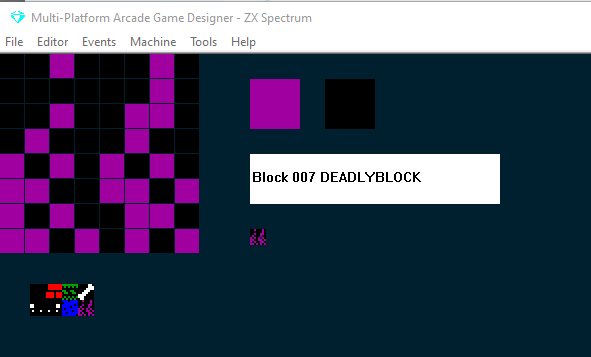
Desenha o teu DEADLYBLOCK e continua a clicar no seletor branco do tipo de bloco até chegares a DEADLYBLOCK.
A seguir, vamos adicionar alguns blocos mortais a um ecrã: no menu Editor, seleciona screens, depois clica no teu bloco mortal no banco de blocos e clica para colocar alguns no teu ecrã:
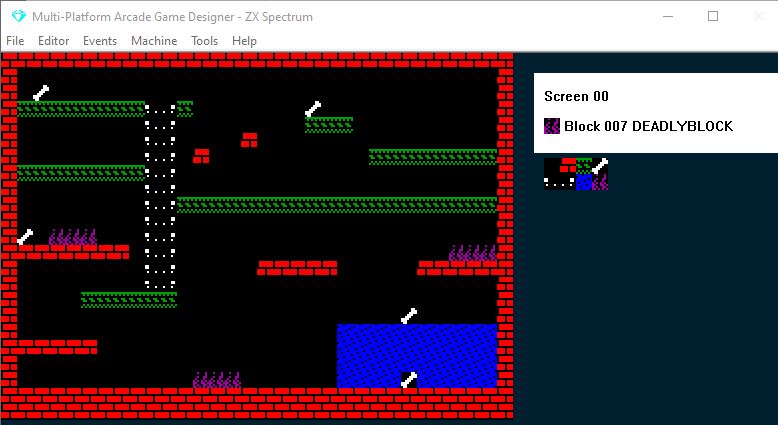
Depois, dá uma vista de olhos ao código do teu PLAYER EVENT; deves encontrar uma instrução parecida com esta:
IF DEADLY                      ; am I touching something deadly?
    KILL                       ; if so, kill me
ENDIF
DEADLY é uma função: verifica se o jogador está a tocar num DEADLYBLOCK e, se estiver, executa o que estiver dentro da instrução IF...ENDIF; por predefinição, será KILL
MAS NÃO TEM DE SER ASSIM! Podias mudar isto; na verdade, podes fazer o que quiseres com isso... nem sequer tem de ser algo mau ou prejudicial para o jogador!
Por agora, vamos deixá-lo como está e testar o nosso jogo.
Agora o Stinky Dog morre se tocar nos picos mortais.
CUSTOMBLOCKs
A muitos níveis, os CUSTOMBLOCKs funcionam exatamente como os DEADLYBLOCKS: também têm uma função correspondente que podemos testar com IF CUSTOM.
Só tens de escrever algum código que seja ativado quando o jogador tocar num CUSTOMBLOCK.
Vamos criar gelo escorregadio, de modo que, se o Stinky Dog ficar em cima dele, deslize: abre o BLOCK EDITOR, prime X para um novo bloco e desenha gelo. Depois clica no seletor branco de tipo de bloco e para em CUSTOMBLOCK:
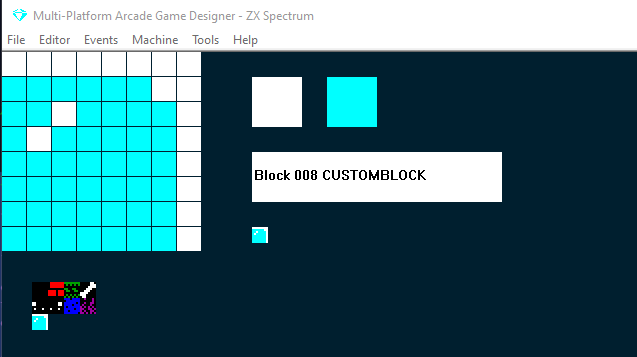
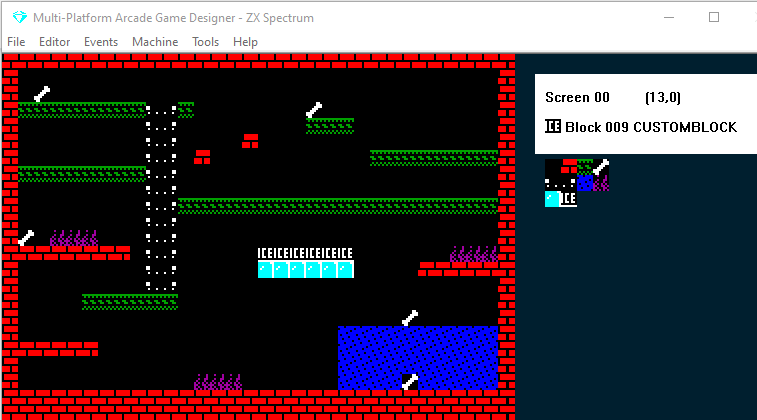
Agora vamos adicionar uma fila destes blocos de gelo personalizados ao nosso ecrã: (Editor > Screens )
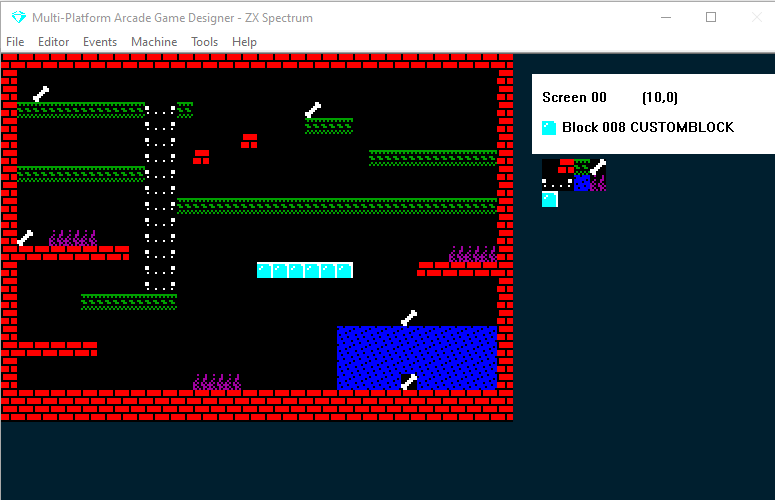
E antes de escrevermos código para o que deve acontecer, vamos ver o que acontece por predefinição; testa o teu jogo:
Como vês, por predefinição os CUSTOMBLOCKs são como os EMPTYBLOCKS: o jogador simplesmente atravessa-os, o que faz sentido, já que os podemos usar para o fim que quisermos. Mas no nosso jogo, idealmente queremos que sejam como os WALLBLOCKS: o jogador não os consegue atravessar mas pode ficar em cima deles... mas depois com uma propriedade especial que obriga o jogador a mover-se na direção para que está virado.
Primeiro, vamos ver se conseguimos isto escrevendo código. Podemos experimentar o comando STOPFALL, que impede o jogador de cair através deles. Depois, como estamos a guardar a direção atual do jogador na variável DIRECTION, podemos escrever algumas instruções IF DIRECTION = para forçar o movimento... poderia ficar assim:
IF CUSTOM                      ; if player touches the ice
   STOPFALL                    ; stop them falling
   IF DIRECTION = LEFT         ; if they were travelling left
      SPRITELEFT               ; go left
      SPRITELEFT               ; go left some more
   ENDIF
   IF DIRECTION = RIGHT        ; if they were going right
      SPRITERIGHT              ; go right
      SPRITERIGHT              ; go right some more
   ENDIF
ENDIF
Repara que dupliquei os SPRITELEFT/RIGHT: isto deve dar o efeito de movimento mais rápido no gelo. Vamos testar:
Ok, mais ou menos funciona: da primeira vez que saltei para o gelo deslizei para a esquerda, mas quando bati no gelo por baixo deslizei para a direita pela cabeça. Depois saltei de novo para cima e usei as teclas LEFT e RIGHT e o Stinky Dog deslizou de um lado para o outro.
A função IF CUSTOM só sabe que estou a tocar num bloco personalizado; não sabe que é gelo nem que não posso deslizar por baixo dele.
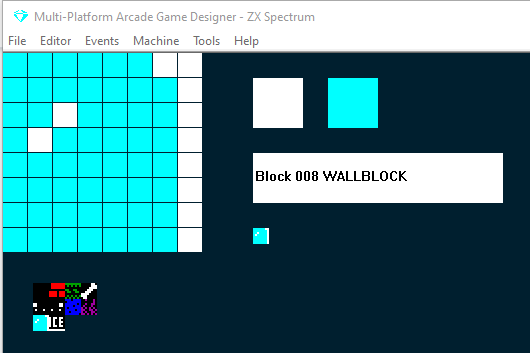
O truque para resolver este problema no nosso jogo é mudar os blocos de gelo para WALLBLOCKS e depois criar um novo bloco CUSTOM que vamos colocar por cima dos WALLBLOCKS de gelo. Antes de testarmos, vamos remover o comando STOPFALL do código IF CUSTOM que acabámos de escrever. Vamos testar:
Muda o bloco de gelo para um WALLBLOCK:
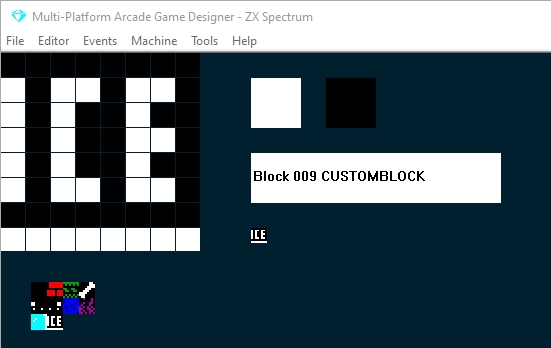
Cria um novo bloco personalizado (escrevi a palavra ICE nele para que o possas ver quando o colocarmos no ecrã... vamos removê-la mais tarde):
Adiciona os teus novos blocos personalizados por cima do gelo
E testa:
Ok, está a melhorar: agora o Stinky Dog desliza no gelo e também não consegue deslizar por baixo. No entanto, ainda se consegue mover da esquerda para a direita com as teclas LEFT e RIGHT. Isto pode servir para o teu jogo, mas eu quero forçar o movimento e não lhe permitir mover-se nem saltar quando está no gelo.
E a solução para isto é bastante fácil: tudo o que temos de fazer é envolver todas as nossas instruções IF KEY na parte ELSE de:
IF CUSTOM
{force the sliding on the ice}
ELSE
{all the if key statements go here}
ENDIF
Isto significa: enquanto não estivermos a tocar num bloco personalizado, podes usar as teclas para te moveres. Vamos testar (nota que removi a palavra ICE do meu bloco personalizado e deixei a única fila de píxeis brancos na parte inferior):
Para verificares o teu progresso, é assim que o código do teu PLAYER EVENT deve estar a esta altura:
EVENT PLAYER
;===============STINKY DOG=================
IF CUSTOM
   IF DIRECTION = LEFT         ; if they were travelling left
      SPRITELEFT               ; go left
      SPRITELEFT               ; go left some more
   ENDIF
   IF DIRECTION = RIGHT        ; if they were going right
      SPRITERIGHT              ; go right
      SPRITERIGHT              ; go right some more
   ENDIF
ELSE
   IF KEY LEFT                    ; Is the left key pressed?
       LET DIRECTION = LEFT       ; if so, remember I am going LEFT
       LET IMAGE = 1              ; display the left facing image
       IF X <= LEFTEDGE           ; are we at the left edge of the screen?
           SCREENLEFT             ; if so, go to the screen to left on the map
           LET X = RIGHTEDGE      ; and put me at the right edge of that screen
           EXIT                   ; and stop processing this event
       ELSE                       ; if I'm not at the left edge
           IF CANGOLEFT           ; is there space to the left of me?
               SPRITELEFT         ; if so move me left
               ANIMATE            ; and animate me
	       ELSE
		      DIG LEFT
           ENDIF
       ENDIF
   ENDIF

   IF KEY RIGHT                   ; Is the right key pressed?
      LET DIRECTION = RIGHT      ; if so, remember I am going RIGHT
      LET IMAGE = 0              ; display the right facing image
      IF X >= RIGHTEDGE          ; Am I at the right edge of the screen?
         SCREENRIGHT            ; if so go to the screen to right on the map
         LET X = LEFTEDGE       ; and put me at the left edge
         EXIT                   ; and stop processing this event
      ELSE                       ; if I'm not at the right edge
         IF CANGORIGHT          ; is there space to the right of me?
            SPRITERIGHT         ; if so, move me right
            ANIMATE             ; and animate me?
	     ELSE
		    DIG RIGHT
         ENDIF
      ENDIF
   ENDIF

   IF KEY UP                      ; is the UP key pressed?
      ANIMATE SLOW                ; if so, animate me slowly
      IF LADDERABOVE              ; is there a ladder above me?
         IF CANGOUP               ; can I go up?
            LET IMAGE = 3         ; display the image of me climbing
    	    SPRITEUP              ; move me up
            LET DIRECTION = UP    ; remember I am going up
         ELSE                     ; if there is a ladder above me, but I cant go up
            ADD 1 TO Y            ; nudge me 1 pixel to the right
         ENDIF
      ELSE                        ; if there isn't a ladder above me
         SPRITELEFT               ; move me left
         IF LADDERABOVE           ; now is there a ladder above me?
         ELSE                     ; if not
            SPRITERIGHT           ; move me back where I was
            SPRITERIGHT           ; then a bit more to the right
            IF LADDERABOVE        ; now is there a ladder above me?
      	    ELSE                  ; if not
               SPRITELEFT         ; move me back where I was
            ENDIF
         ENDIF
      ENDIF
   ENDIF


   IF KEY DOWN                    ; is the DOWN key pressed?
      ANIMATE SLOW                ; if so, animate me slowly
      IF LADDERBELOW              ; is there a ladder below me?
         LET IMAGE = 3            ; if so, set my image to the climbing one
         SPRITEDOWN               ; move me down
         LET DIRECTION = DOWN     ; remember I am going down
      ELSE                        ; if there isn't a ladder below me
         SPRITELEFT               ; move me left
         IF LADDERBELOW           ; is there a ladder below me now?
         ELSE                     ; if not
            SPRITERIGHT           ; move me back where I was
            SPRITERIGHT           ; then a bit more to the right
            IF LADDERBELOW        ; now is there a ladder below me?
            ELSE                  ; if not
               SPRITELEFT         ; move me back where I was
            ENDIF
         ENDIF
      ENDIF
   ENDIF


   IF KEY FIRE                    ; is the Fire key being pressed?
      JUMP 7                     ; if so, make me Jump to height 7
   ENDIF
 ENDIF                          ; end of the movement code
 IF KEY FIRE2                    ; is the FIRE2 key being pressed?
   IF F = 0                     ; if there is no fart in play
      IF DIRECTION = LEFT       ; if Stinky Dog is facing Left
         ADD 16 TO X            ; set X 16 pixels to the right
         SPAWN 2 4              ; SPAWN a fart (TYPE 2, IMAGE 4)
         SUBTRACT 16 FROM X     ; reset X to its original position
         LET F = 1              ; there is now a fart in play
      ELSE
         IF DIRECTION = RIGHT   ; if Stinky Dog is facing Right
            SUBTRACT 16 FROM X  ; set X 16 pixels to the left
            SPAWN 2 4           ; SPAWN a fart (TYPE 2, IMAGE 4)
            ADD 16 TO X         ; reset X to its original position
            LET F = 1           ; there is now a fart in play
         ENDIF
      ENDIF
   ENDIF
ENDIF


FALL                           ; make me fall if there is nothing below me

IF DEADLY                      ; am I touching something deadly?
    KILL                       ; if so, kill me
ENDIF


GETBLOCKS                      ; if I touch any collectible blocks, run the Collected Block script
WATERBLOCKS
Na versão 0.7.10 do MPAGD, os WATERBLOCKs ainda não estão totalmente implementados: podes criar waterblocks mas não terão qualquer funcionalidade especial, serão como EMPTYBLOCKS. Quando forem totalmente implementados, vou atualizar este tutorial. SEGUINTE: PARTE 20: SCOREs, LIVES e mostrar coisas no ecrã.