
Terminemos de aprender los distintos tipos de bloques que podemos usar para diseñar las pantallas de nuestro juego viendo los que aún no hemos usado:
DEADLYBLOCKs
CUSTOMBLOCKs
WATERBLOCKs
DEADLY BLOCKS
En general usamos DEADLYBLOCKS cuando queremos causar daño o matar al jugador si los toca.
Vamos a crear unos pinchos mortales... abre el Block Editor y pulsa X para añadir un bloque nuevo:
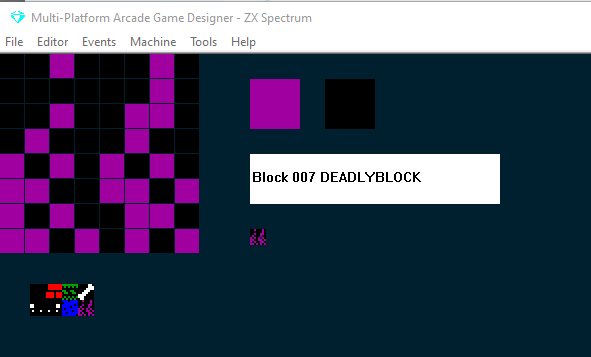
Diseña tu DEADLYBLOCK y sigue haciendo clic en el selector blanco de tipo de bloque hasta llegar a DEADLYBLOCK.
A continuación, añadiremos algunos bloques mortales a una pantalla: en el menú Editor selecciona screens, luego haz clic en tu bloque mortal en el banco de bloques y haz clic para colocar algunos en tu pantalla:
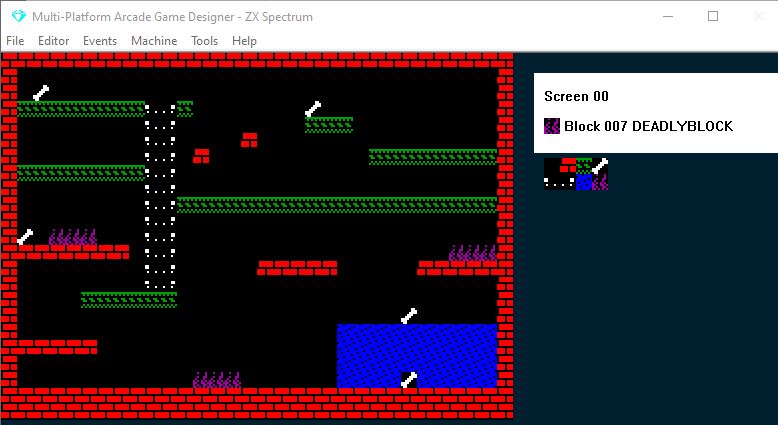
Después, echa un vistazo al código de tu PLAYER EVENT; deberías encontrar una sentencia que se parece a esto:
IF DEADLY                      ; am I touching something deadly?
    KILL                       ; if so, kill me
ENDIF
DEADLY es una función: comprueba si el jugador está tocando un DEADLYBLOCK y, si es así, ejecuta lo que haya dentro de la sentencia IF...ENDIF. Por defecto, será KILL
¡PERO NO TIENE POR QUÉ! Podrías cambiarlo; de hecho, puedes hacer lo que quieras con ello... ¡ni siquiera tiene que ser algo malo o dañino para el jugador!
Por ahora lo dejaremos como está y probaremos nuestro juego.
Ahora Stinky Dog morirá si toca los pinchos mortales.
CUSTOMBLOCKs
En muchos aspectos los CUSTOMBLOCKs funcionan exactamente igual que los DEADLYBLOCKS: también tienen una función correspondiente que podemos comprobar con IF CUSTOM.
Solo tienes que escribir algo de código que se active cuando el jugador toque un CUSTOMBLOCK.
Vamos a crear hielo resbaladizo, de modo que si Stinky Dog se sube a él se deslice: abre el BLOCK EDITOR, pulsa X para un bloque nuevo y diseña algo de hielo. Luego haz clic en el selector blanco de tipo de bloque hasta detenerte en CUSTOMBLOCK:
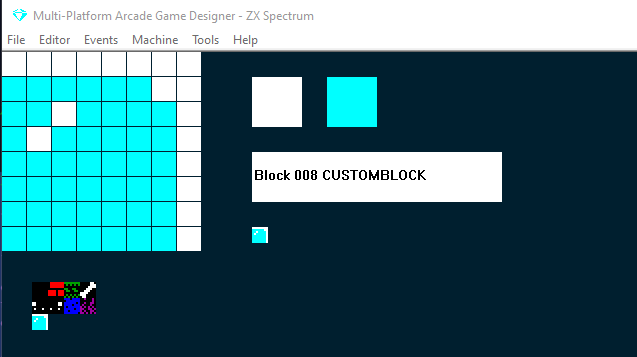
Ahora añadamos una fila de estos bloques de hielo personalizados a nuestra pantalla: (Editor > Screens )
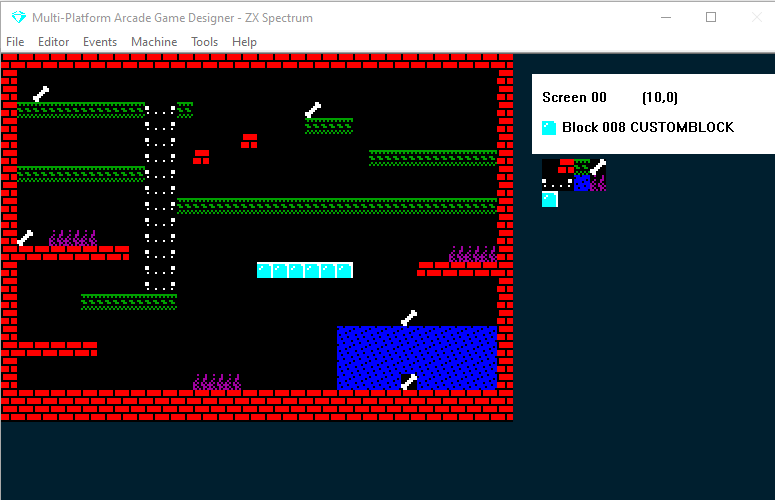
Y antes de escribir ningún código sobre lo que debe ocurrir, veamos qué pasa por defecto; prueba tu juego:
Como ves, por defecto los CUSTOMBLOCKs son como los EMPTYBLOCKS: el jugador simplemente los atraviesa, lo cual tiene sentido, ya que podemos usarlos para lo que queramos. Pero en nuestro juego, lo ideal es que sean como los WALLBLOCKS, que el jugador no pueda atravesarlos pero sí pararse sobre ellos... pero que además tengan una propiedad especial que obligue al jugador a moverse en la dirección en la que mira.
Primero, veamos si podemos conseguirlo escribiendo código. Podríamos probar el comando STOPFALL, que impide que el jugador se caiga a través de ellos. Luego, como guardamos la dirección actual del jugador en la variable DIRECTION, podríamos escribir unas sentencias IF DIRECTION = para forzar el movimiento... quedaría más o menos así:
IF CUSTOM                      ; if player touches the ice
   STOPFALL                    ; stop them falling
   IF DIRECTION = LEFT         ; if they were travelling left
      SPRITELEFT               ; go left
      SPRITELEFT               ; go left some more
   ENDIF
   IF DIRECTION = RIGHT        ; if they were going right
      SPRITERIGHT              ; go right
      SPRITERIGHT              ; go right some more
   ENDIF
ENDIF
Fíjate en que he duplicado los SPRITELEFT/RIGHT: esto debería dar el efecto de un movimiento más rápido sobre el hielo. Probémoslo:
Vale, más o menos funciona: la primera vez que salté sobre el hielo me deslicé hacia la izquierda, pero cuando golpeé el hielo desde abajo me deslicé hacia la derecha por la cabeza. Luego volví a saltar encima y usé las teclas LEFT y RIGHT y Stinky Dog se deslizó de lado a lado.
La función IF CUSTOM solo sabe que estoy tocando un bloque personalizado; no sabe que es hielo ni que no puedo deslizarme por debajo.
El truco para resolverlo en nuestro juego es cambiar los bloques de hielo a WALLBLOCKS y crear un nuevo bloque CUSTOM que colocaremos encima de los WALLBLOCKS de hielo. Antes de probarlo, quitaremos el comando STOPFALL del código IF CUSTOM que acabamos de escribir. Probémoslo:
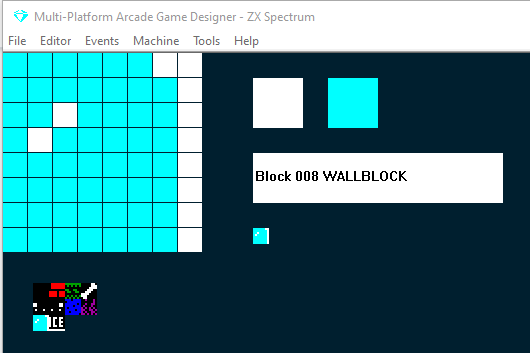
Cambia el bloque de hielo a un WALLBLOCK:
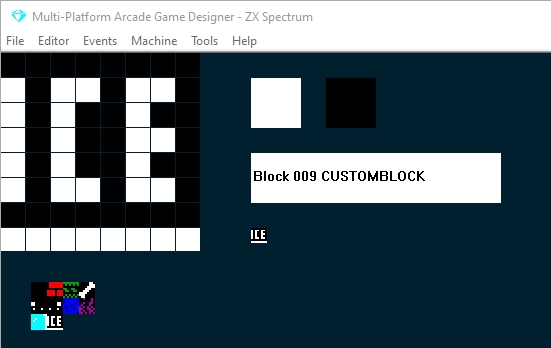
Crea un nuevo bloque personalizado (le he escrito la palabra ICE para que se vea cuando lo coloquemos en la pantalla... la quitaremos después):
Añade tus nuevos bloques personalizados encima del hielo
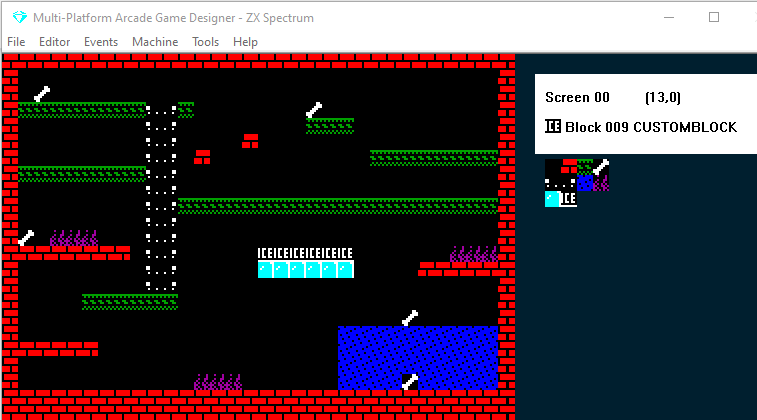
Y pruébalo:
Vale, va mejorando: ahora Stinky Dog se desliza sobre el hielo y tampoco puede deslizarse por debajo. Sin embargo, todavía puede moverse de izquierda a derecha con las teclas LEFT y RIGHT. Puede que esto te valga para tu juego, pero yo quiero forzar el movimiento y no permitirle moverse ni saltar cuando está sobre el hielo.
Y la solución es bastante fácil: solo tenemos que meter todas nuestras sentencias IF KEY dentro de la parte ELSE de:
IF CUSTOM
{force the sliding on the ice}
ELSE
{all the if key statements go here}
ENDIF
Esto significa: mientras no estemos tocando un bloque personalizado, puedes usar las teclas para moverte. Probémoslo (ten en cuenta que he quitado la palabra ICE de mi bloque personalizado y he dejado la única fila de píxeles blancos en la parte inferior):
Para comprobar tu progreso, así debería quedar ya tu código del PLAYER EVENT:
EVENT PLAYER
;===============STINKY DOG=================
IF CUSTOM
   IF DIRECTION = LEFT         ; if they were travelling left
      SPRITELEFT               ; go left
      SPRITELEFT               ; go left some more
   ENDIF
   IF DIRECTION = RIGHT        ; if they were going right
      SPRITERIGHT              ; go right
      SPRITERIGHT              ; go right some more
   ENDIF
ELSE
   IF KEY LEFT                    ; Is the left key pressed?
       LET DIRECTION = LEFT       ; if so, remember I am going LEFT
       LET IMAGE = 1              ; display the left facing image
       IF X <= LEFTEDGE           ; are we at the left edge of the screen?
           SCREENLEFT             ; if so, go to the screen to left on the map
           LET X = RIGHTEDGE      ; and put me at the right edge of that screen
           EXIT                   ; and stop processing this event
       ELSE                       ; if I'm not at the left edge
           IF CANGOLEFT           ; is there space to the left of me?
               SPRITELEFT         ; if so move me left
               ANIMATE            ; and animate me
	       ELSE
		      DIG LEFT
           ENDIF
       ENDIF
   ENDIF

   IF KEY RIGHT                   ; Is the right key pressed?
      LET DIRECTION = RIGHT      ; if so, remember I am going RIGHT
      LET IMAGE = 0              ; display the right facing image
      IF X >= RIGHTEDGE          ; Am I at the right edge of the screen?
         SCREENRIGHT            ; if so go to the screen to right on the map
         LET X = LEFTEDGE       ; and put me at the left edge
         EXIT                   ; and stop processing this event
      ELSE                       ; if I'm not at the right edge
         IF CANGORIGHT          ; is there space to the right of me?
            SPRITERIGHT         ; if so, move me right
            ANIMATE             ; and animate me?
	     ELSE
		    DIG RIGHT
         ENDIF
      ENDIF
   ENDIF

   IF KEY UP                      ; is the UP key pressed?
      ANIMATE SLOW                ; if so, animate me slowly
      IF LADDERABOVE              ; is there a ladder above me?
         IF CANGOUP               ; can I go up?
            LET IMAGE = 3         ; display the image of me climbing
    	    SPRITEUP              ; move me up
            LET DIRECTION = UP    ; remember I am going up
         ELSE                     ; if there is a ladder above me, but I cant go up
            ADD 1 TO Y            ; nudge me 1 pixel to the right
         ENDIF
      ELSE                        ; if there isn't a ladder above me
         SPRITELEFT               ; move me left
         IF LADDERABOVE           ; now is there a ladder above me?
         ELSE                     ; if not
            SPRITERIGHT           ; move me back where I was
            SPRITERIGHT           ; then a bit more to the right
            IF LADDERABOVE        ; now is there a ladder above me?
      	    ELSE                  ; if not
               SPRITELEFT         ; move me back where I was
            ENDIF
         ENDIF
      ENDIF
   ENDIF


   IF KEY DOWN                    ; is the DOWN key pressed?
      ANIMATE SLOW                ; if so, animate me slowly
      IF LADDERBELOW              ; is there a ladder below me?
         LET IMAGE = 3            ; if so, set my image to the climbing one
         SPRITEDOWN               ; move me down
         LET DIRECTION = DOWN     ; remember I am going down
      ELSE                        ; if there isn't a ladder below me
         SPRITELEFT               ; move me left
         IF LADDERBELOW           ; is there a ladder below me now?
         ELSE                     ; if not
            SPRITERIGHT           ; move me back where I was
            SPRITERIGHT           ; then a bit more to the right
            IF LADDERBELOW        ; now is there a ladder below me?
            ELSE                  ; if not
               SPRITELEFT         ; move me back where I was
            ENDIF
         ENDIF
      ENDIF
   ENDIF


   IF KEY FIRE                    ; is the Fire key being pressed?
      JUMP 7                     ; if so, make me Jump to height 7
   ENDIF
 ENDIF                          ; end of the movement code
 IF KEY FIRE2                    ; is the FIRE2 key being pressed?
   IF F = 0                     ; if there is no fart in play
      IF DIRECTION = LEFT       ; if Stinky Dog is facing Left
         ADD 16 TO X            ; set X 16 pixels to the right
         SPAWN 2 4              ; SPAWN a fart (TYPE 2, IMAGE 4)
         SUBTRACT 16 FROM X     ; reset X to its original position
         LET F = 1              ; there is now a fart in play
      ELSE
         IF DIRECTION = RIGHT   ; if Stinky Dog is facing Right
            SUBTRACT 16 FROM X  ; set X 16 pixels to the left
            SPAWN 2 4           ; SPAWN a fart (TYPE 2, IMAGE 4)
            ADD 16 TO X         ; reset X to its original position
            LET F = 1           ; there is now a fart in play
         ENDIF
      ENDIF
   ENDIF
ENDIF


FALL                           ; make me fall if there is nothing below me

IF DEADLY                      ; am I touching something deadly?
    KILL                       ; if so, kill me
ENDIF


GETBLOCKS                      ; if I touch any collectible blocks, run the Collected Block script
WATERBLOCKS
A partir de MPAGD 0.7.10 los WATERBLOCKs no están implementados del todo: puedes crear waterblocks pero no tendrán ninguna característica especial, serán como EMPTYBLOCKS. Cuando se implementen por completo actualizaré este tutorial. SIGUIENTE: PARTE 20: SCOREs, LIVES y mostrar cosas en pantalla.