
Porquê? Bem... porque não?
Isto foi algo que escrevi pela primeira vez para Cocoa and the Time Machine. Queria um canhão que disparasse balas de canhão que seguissem diferentes trajetórias... e saltassem ao tocar no chão, perdendo gradualmente o impulso.
Aqui está um em ação.
Pode parecer que há matemática complicada, mas não tenhas medo: é bastante simples e baseia-se sobretudo em aproveitar o comando JUMP do MPAGD.
Podemos pensar que o JUMP só é relevante para o jogador, mas o MPAGD permite que qualquer sprite use JUMP. Também aceita um parâmetro que controla a altura a que o sprite pode saltar.
Assim, na prática, a nossa bala de canhão limita-se a fazer uma série de saltos cada vez mais pequenos.
Primeiro vamos precisar de um par de sprites, um para o canhão e outro para a bala de canhão (ou escolhe a artilharia que preferires).
Para o canhão vou criar dois fotogramas, um virado para a esquerda e outro para a direita. Consoante o sítio onde colocar o canhão num ecrã, quero que aponte na direção certa (precisamos de algum espaço para trabalhar, por isso é provável que os canhões fiquem perto dos limites direito ou esquerdo).
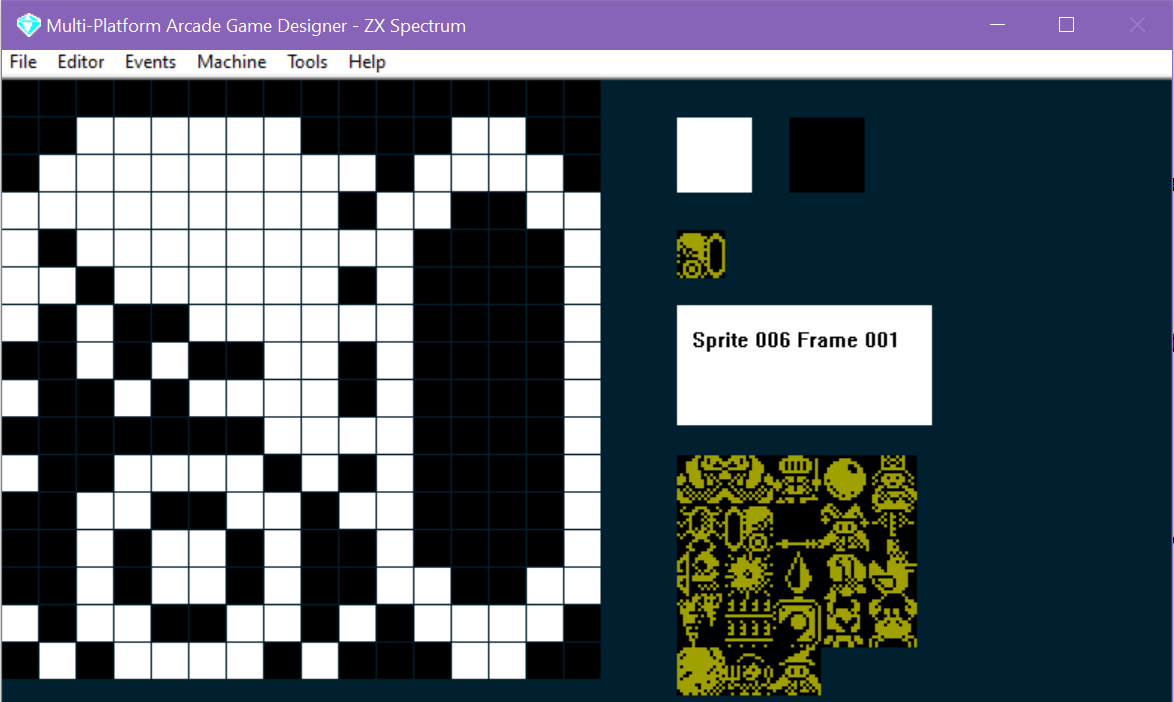
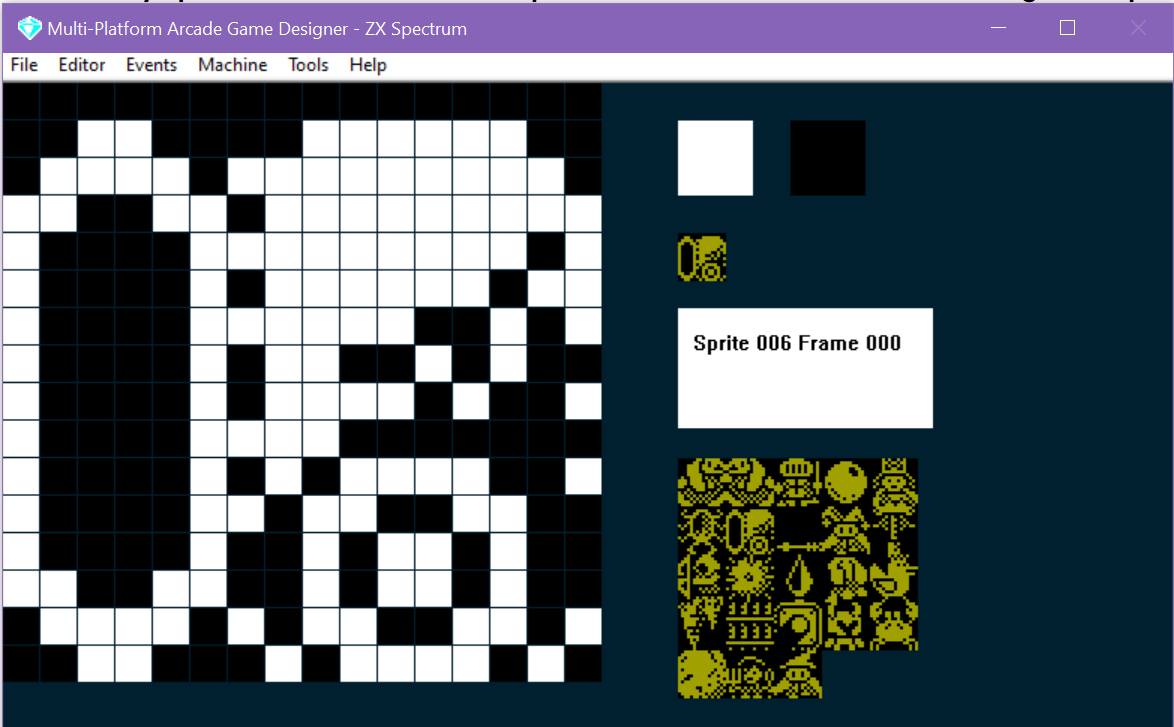
A seguir, vamos escrever o código do canhão. Vou mantê-lo o mais básico possível: tudo o que quero é poder colocar um canhão num ecrã e, se ainda não houver uma bala de canhão em jogo, disparar uma.
Aqui está o código:
IF IMAGE 6
   SPRITEINK 11
   IF S = 0                                ; if there is no cannonball currently in play
      IF FRAME = 0                         ; if the cannon is facing left
	 SUBTRACT 8 FROM X                 ; 8 pixels to the left of the canon
         SPAWN 8 3                         ; spawn a cannonball (TYPE = 8 IMAGE = 3)
	 ADD 8 TO X                        ; reset the cannons X co-ord so it doesn't move
	 LET S = 1                         ; the cannonball should go left
      ELSE                                 ; the cannon is facing right
	 ADD 8 TO X                        ; 8 pixels to the right of the cannon
         SPAWN 8 3                         ; spawn a cannonball
	 SUBTRACT 8 FROM X                 ; reset the cannons x co-ord so it doesn't move
	 LET S = 2                         ; the cannonball should go right
      ENDIF
   ENDIF
ENDIF
Portanto, tudo o que fazemos aqui é verificar se não há nenhuma bala de canhão em jogo (a variável S), e depois ver se o canhão aponta para a esquerda ou para a direita (o que sabemos pelo FRAME), a seguir fazemos surgir uma CANNONBALL (que é a minha IMAGE 3 e cujo script de evento está em TYPE 8), e depois mudamos a variável S para 1 ou 2 (o que indica aos outros scripts que há uma bala de canhão em jogo: 1 se vai para a esquerda ou 2 se vai para a direita)
A seguir, vamos criar o script das balas de canhão.
IF IMAGE 3
   SPRITEINK 7
   IF S = 1                            ; is the cannonball going left?
      IF CANGOLEFT                     ; can it go left?
         SPRITELEFT                    ; go left
         IF SETTINGA = 0               ; has it just been fired?
	    LET SETTINGA = 1           ; remember we've fired it
            CRASH 50                   ; make a sound
            JUMP SETTINGB              ; jump (to the height stored in settingb)
         ENDIF
      ENDIF

      IF CANGODOWN                     ; if the cannonball cant go down, it must be on the ground
      ELSE
         IF SETTINGB >= 1              ; as long as SettingB isn't 0
	    SUBTRACT 1 FROM SETTINGB   ; reduce settingb (the height of the next jump) by 1
	 ENDIF
     	 CRASH 30                      ; make a sound
         JUMP SETTINGB                 ; bounce!
      ENDIF

      IF X <= LEFTEDGE                 ; has the cannonball reached the left edge of the screen?
	  REMOVE                       ; if so, remove the cannonball
	  LET S = 0                    ; remember there is no cannonball in play now
      ENDIF
   ENDIF

   IF S = 2                            ; is the cannonball going left?
      IF CANGORIGHT                    ; can it go left?
         SPRITERIGHT                   ; go left
         IF SETTINGA = 0               ; has it just been fired?
            LET SETTINGA = 1           ; remember we've fired it
            CRASH 50                   ; make a sound
            JUMP SETTINGB              ; jump (to the height stored in settingb)
         ENDIF
      ENDIF

      IF CANGODOWN                     ; if the cannonball cant go down, it must be on the ground
      ELSE
         IF SETTINGB >= 1              ; as long as SettingB isn't 0
	    SUBTRACT 1 FROM SETTINGB   ; reduce settingb (the height of the next jump) by 1
	 ENDIF
     	 CRASH 30                      ; make a sound
         JUMP SETTINGB                 ; bounce!
      ENDIF

      IF X >= RIGHTEDGE                ; has the cannonball reached the left edge of the screen?
	 REMOVE                        ; if so, remove the cannonball
	 LET S = 0                     ; remember there is no cannonball in play now
      ENDIF
   ENDIF
ENDIF
Agora, se estiveste a olhar com atenção para o código, vais reparar que não vai funcionar bem. Isso acontece porque precisa de um valor em SETTINGB que determine a altura do JUMP (o ressalto).
Por isso, vamos definir SETTINGB no script SPRITE INITIALISATION... podíamos usar um valor fixo (ou seja, LET SETTINGB = 10) ou torná-lo aleatório... talvez algo como...
   IF IMAGE 3
      LET SETTINGA = 0                  ; we need this to track whether it is the first jump
      GETRANDOM 6                       ; gets a  random number from 0 -5
      ADD 3 TO RND                      ; add 3 to it ( will now be in range 3 - 8)
      MULTIPLY RND BY 2                 ; multiply it by 2 (will now be in range 6 to 16)
      LET SETTINGB = RND                ; put the number in SettingB as the initial jump height
 ENDIF
Ou talvez usar uma instrução DATA e fazer READ SETTINGB a partir dela, de modo a teres uma sequência de alturas com que as balas de canhão começam a saltar.
Também precisamos de colocar algum código para inicializar o canhão. Lembra-te de que criei dois fotogramas, um a apontar para a direita e outro para a esquerda. Quando inicializarmos um canhão, vamos ver em que lado do ecrã está colocado e depois mudar o fotograma para apontar para o outro lado:
   IF IMAGE 6                                ; are you a cannon?
      IF X <= 127                            ; are you on the left side of the screen?
	 LET FRAME = 1                       ; if so point right
      ELSE                                   ; otherwise you must be on the right
	 LET FRAME = 0                       ; so point left
      ENDIF
   ENDIF
Assim, na sua forma mais simples, é assim que se faz. Obviamente vais querer escrever algum script de COLLISION que determine o que acontece quando a bala de canhão atinge o jogador.
Além disso, devido à forma como estruturámos o script principal da bala de canhão, seria muito fácil fazer a bala ressaltar numa parede. Tudo o que precisamos de fazer é verificar o caminho em frente para ver se a bala de canhão está prestes a bater num bloco de parede e, se estiver, alterar a variável S. Podemos fazê-lo assim (dentro do IF S = 1... ou seja, quando vai para a esquerda):
	  SUBTRACT 1 FROM X
	  GETBLOCK X Y
	  ADD 1 TO X
	  IF BLOCK = WALLBLOCK
	     LET S = 2
	  ENDIF
Isto apenas verifica 1 pixel à esquerda do sprite (lembra-te de que o valor de x é o lado esquerdo do sprite) para ver se é um bloco de parede e, se for, muda S para 2, o que a enviará para a direita.
Depois, no IF S = 2 ....ENDIF vamos acrescentar:
	  ADD 16 TO X
	  GETBLOCK X Y
	  SUBTRACT 16 FROM X
	  IF BLOCK = WALLBLOCK
	     LET S = 1
	  ENDIF
Repara que temos de somar 16 a X para verificar o que está à direita do sprite
Na verdade, não estamos a alterar o valor de X do sprite, e é por isso que devolvemos sempre X ao seu valor original assim que fazemos o GETBLOCK... caso contrário, o teu sprite moverá de forma incorreta.
Portanto, agora o nosso código deverá ficar assim:
IF IMAGE 3
   SPRITEINK 7
   IF S = 1                            ; is the cannonball going left?
      IF CANGOLEFT                     ; can it go left?
         SPRITELEFT                    ; go left
         IF SETTINGA = 0               ; has it just been fired?
	    LET SETTINGA = 1           ; remember we've fired it
            CRASH 50                   ; make a sound
            JUMP SETTINGB              ; jump (to the height stored in settingb)
         ENDIF
      ENDIF

      IF CANGODOWN                     ; if the cannonball cant go down, it must be on the ground
      ELSE
	 IF SETTINGB >= 1              ; as long as SettingB isn't 0
	    SUBTRACT 1 FROM SETTINGB   ; reduce settingb (the height of the next jump) by 1
	 ENDIF
     	 CRASH 30                      ; make a sound
         JUMP SETTINGB                 ; bounce!
      ENDIF

	  IF X <= LEFTEDGE                 ; has the cannonball reached the left edge of the screen?
	    REMOVE                        ; if so, remove the cannonball
	    LET S = 0                     ; remember there is no cannonball in play now
	  ENDIF

	  SUBTRACT 1 FROM X
	  GETBLOCK X Y
	  ADD 1 TO X
	  IF BLOCK = WALLBLOCK
	     LET S = 2
	  ENDIF


   ENDIF

   IF S = 2                            ; is the cannonball going left?
      IF CANGORIGHT                    ; can it go left?
         SPRITERIGHT                   ; go left
         IF SETTINGA = 0               ; has it just been fired?
            LET SETTINGA = 1           ; remember we've fired it
            CRASH 50                   ; make a sound
            JUMP SETTINGB              ; jump (to the height stored in settingb)
         ENDIF
      ENDIF

      IF CANGODOWN                     ; if the cannonball cant go down, it must be on the ground
      ELSE
         IF SETTINGB >= 1              ; as long as SettingB isn't 0
            SUBTRACT 1 FROM SETTINGB   ; reduce settingb (the height of the next jump) by 1
	 ENDIF
     	 CRASH 30                      ; make a sound
         JUMP SETTINGB                 ; bounce!
      ENDIF

	  IF X >= RIGHTEDGE                ; has the cannonball reached the left edge of the screen?
		REMOVE                         ; if so, remove the cannonball
		LET S = 0                      ; remember there is no cannonball in play now
	  ENDIF

	  ADD 16 TO X
	  GETBLOCK X Y
	  SUBTRACT 16 FROM X
	  IF BLOCK = WALLBLOCK
	     LET S = 1
	  ENDIF
   ENDIF
ENDIF
O que deverá acabar por ter um aspeto semelhante a isto:
Podes adaptar facilmente este script aos teus próprios jogos. Lembra-te de que o mantive simples e só permito uma bala de canhão em jogo de cada vez, o que me permite ter outros sprites no ecrã (tens de ter cuidado para não ultrapassar o máximo por ecrã, caso contrário acontecerão coisas estranhas).
Espero que isto ajude!