
A bit of a different tutorial today, rather than focusing on enemy sprite events here's a method for adding random item bonus drops...and flashy banner messages in your MPAGD games.
This is something I first wrote for Cocoa and the Time Machine and then improved in 24 Hour Parsley People.
What I wanted to achieve was...
Player has defeated an enemy
Randomly drop a bonus item (selected from 4 potential bonuses, weighted so that more powerful bonuses drop more rarely)
Player collects bonus item
Bonus item awards energy/points/whatever
Banner flashes on screen
Here's an example of it in action in a demo screen, using some of the code from my latest game in which our hero Cocoa can deflect the Agents bullets using the Tesla Device...and when an Agent is defeated we drop a bonus item for Cocoa to collect.
In this example I have four potential Bonus drops:
Standard Parsley (restores 1/3 health) - 40% chance of dropping
Mega Parsley (restores all health) - 12% chance of dropping
Device fuel cell (restores 1/3 device power) - 30% chance of dropping
One Up (an extra life) - 8% chance of dropping
Which leaves us with a 10% chance of no-drop
Here's it in action:
First we're going to need to design some OBJECTS that will be used as the collectible drops, I've created 4 objects, and I've set them all to 'Hidden' (as they won't be positioned in a specific screen or automatically in the players inventory)
We're also going to need some text for our flashing banner. I'm going to keep the code as efficient as possible so it will be a good idea for each MESSAGE number to correspond to its respective OBJECT number.
i.e
OBJECT 0 (Standard Parsley ) MESSAGE 0
OBJECT 1 (Ultra Parsley) MESSAGE 1
OBJECT 2 (Standard Parsley ) MESSAGE 2
OBJECT 3 (Ultra Parsley) MESSAGE 3
So open up your TEXT MESSAGES file, make sure it starts with DEFINEMESSAGES and add your messages, I've added some spaces at the start of some of them as we are going to be printing them in the same place on the screen and I want them as centred as possible:
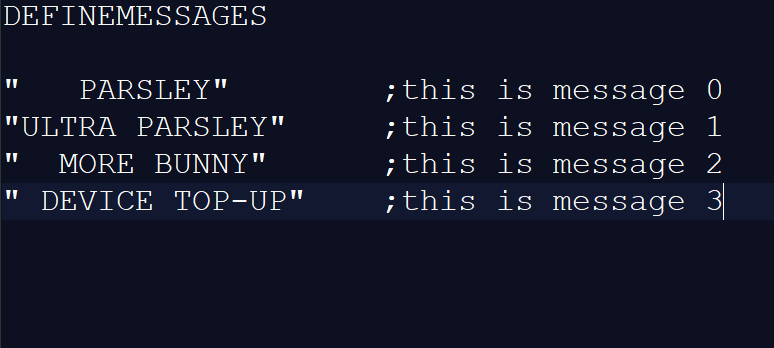
Next, were going to write a little code that will trigger our bonus routine. I'm going to use the variable B for the Bonus routine itself, and specifically the value 2 will be used to call the routine.
I'm going to trigger the Bonus routine when the Enemy is killed by a rebounded bullet. (So I could put this is the Bullet Sprite event or The Agent's event) In this case I've set it in the Agent's event and the Bullet sprite is a Type 2,
   IF COLLISION 2        ; has the bullet hit the agent?
      LET N = X          ; if so, remember the agents X & Y co-ords
      LET O = Y          ; store them in N & O
      LET B = 2          ; start the bonus routine
      REMOVE             ; remove the agent
   ENDIF
Next, we'll create the bonus routine itself, this will select a Random bonus drop based on our preferred weightings, you need to drop this into a MAIN LOOP script:
IF B = 2                           ; BONUS ROUTINE
   GETRANDOM 50                    ; get a random number from 0 to 49
   IF RND <= 19                    ; is it less than 20? (i.e. 40%)
      PUT N O 0                    ; if so, put the PARSLEY object at N O
   ELSE                            ; if not
      IF RND <= 34                 ; is it less than 35 (i.e. is it 20-34 30%)
         PUT N O 3                 ; if so, put the DEVICE FUEL CELL object at N O
      ELSE                         ; if not
         IF RND <= 40              ; is it less than 40? (i.e 35-40 or 12%)
            PUT N O 1              ; if so, put the ULTRA PARSLEY object at N O
         ELSE                      ; if not
            IF RND <= 44           ; is it less than 45? (i.e 41-44 or 8%)
               PUT N O 2           ; if so, put the ONE UP object at NO
	    ENDIF
         ENDIF
      ENDIF
   ENDIF
   LET B = 3                       ; we've slected the bonus so we change B to stop it running again
ENDIF
So now, when the player defeats the enemy there's a 90% chance they will be rewarded with a bonus object to collect. The bonus will appear at N,O (which was the X and y coordinates of the AGENT when he was neutralized.
Now, we'll add some code to the Player Event that will handle what happens when the player collects their bonus:
DETECTOBJ                    ; has the player touched an object?
IF OBJ <> 255                ; is it valid?
   BEEP 25                   ; make a sound
   GET OBJ                   ; collect the object
   IF OBJ = 0                ; is it the standard parsley?
      ADD 33 TO L            ; if so, increase health by 33
   ENDIF
   IF OBJ = 1                ; is it the mega parsley?
      LET L = 99             ; if so, max the health
   ENDIF
   IF OBJ = 2                ; is it the one-up?
      ADD 1 TO LIVES         ; add an extra life
   ENDIF
   IF OBJ = 3                ; is it the device fuel cell?
      ADD 33 TO V            ; increase the device power by 33
   ENDIF
   IF OBJ > 0                ; if it was a Bonus drop object collectded
      IF OBJ <= 3
	 LET B = 5           ; trigger the banner
         LET N = OBJ      ; we'll store the object number in N so that we can call the correct message in the banner
      ENDIF
   ENDIF
ENDIF
Ok, so that will handle the players reward when they collect the bonus, now we want to print a flashy banner to the screen for a bit of fun
Let's go back to the MAIN LOOP script and beneath our IF B=2 ...ENDIF lets add the banner code:
IF B = 5            ; the banner routine
   PRINTMODE 1      ; let's use big text!
   GETRANDOM 8      ; get a random number from 0 to 7
   INK RND          ; make the ink that colour
   AT 9 9           ; this is where the banner will appear on screen
   MESSAGE N        ; display the objects corresponding message
   ADD 1 TO C       ; we'll use C as a counter
   IF C = 30        ; has the banner flashed 30 times?
      LET C = 0     ; reset the counter
      LET B = 0     ; end the bonus
      REDRAW        ; remove the banner from the screen
      PRINTMODE 0   ; go back to normal text size
   ENDIF
ENDIF
As you can see from the code above I'm using the variable C as a counter so that it flashes the banner 30 times. I chose this method rather than a REPEAT loop as I wanted the game to continue while the banner is active, rather than have to wait until the banner has finished before moving on.
And that's it in its simplest form.
Obviously, you can customise this to your hearts content. I use the banner routine for several other things during my games, but essentially, this is how I do it.
Hope this helps!